

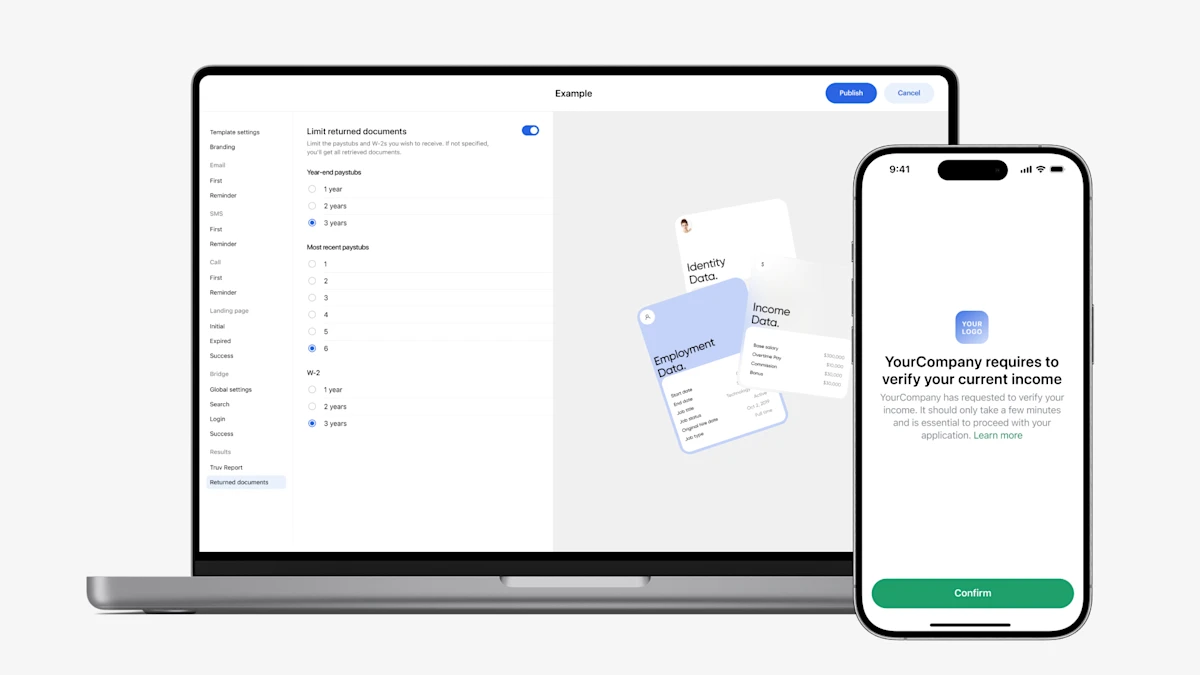
At Truv, our primary focus is dual-sided: deliver an unparalleled verification experience for our clients and deliver an unparalleled verification experience for their borrowers. Through our suite of dynamic products, we’re powering seamless verification workflows for our clients that improve loan cycles and boost operational efficiencies end-to-end. Take a deeper dive into how you can configure and customize Truv income and employment verifications to help your lending teams work faster and smarter.
Customize Branding at the Lender Level
Within Truv Dashboard, Account Administrators have the ability to customize the look and feel of Truv orders to reflect your brand, ensuring order notifications to borrowers include your lender’s name, logo, and colors. When notifications for verification orders are powered by Truv and delivered to borrowers with your lender’s branding, Truv clients average higher conversion rates compared to orders that aren’t branded. Designing an experience that’s easier for you and your borrowers has been our mission from day one.
Customize Orders at the Lender Level
With Truv orders, lenders have a range of flexibility. For a one-size-fits all approach to order set-up, lenders have the option to apply customized settings across all orders within the Truv Dashboard. Configurable order settings include:
- Customer support email address
- Order link expiration deadline from 1 day to 4 weeks
- End user agreement or privacy policy display
- Custom text field that allows order managers to personalize verbiage at the beginning of the order’s email body and landing page
By standardizing order settings for all loan officers and lending teams, order managers and loan officers have less configuration to do when it comes time for Truv verifications, whether it’s proof of income, employment, assets, or homeowners insurance. The standardized approach at the lender level saves order managers and loan officers time on otherwise more tedious backend loan tasks, freeing up time to focus on doing what they do best – building relationships with home buyers and closing loans at speed.
Leverage In-Depth Customization Using Templates
Today, we see two main use cases of our Custom Templates. 1. Lenders leverage multiple Truv products and need to differentiate order specifications and information retrieved in the Truv Report by product type, or 2. Larger lenders with multiple branch locations need differentiated reporting to track Truv performance by loan officers within each branch location.
Truv Custom Templates empower lenders to fine-tune a variety of order configurations, enabling the customization of template names for distinct use cases. After a template is created, it can be assigned to team members based on their roles. This way, when a loan officer or order manager creates a Truv order, their designated template automatically populates with the relevant order parameters. By maximizing automation, lenders can significantly expedite turn times and ramp up efficiencies.
If you’re ready to see Truv in action or learn about how Truv could work for you, reach out to the team today.
Why Lenders Leverage Truv Templates
Truv has developed templates to give lenders enhanced control over their orders, borrower communications, returned data for underwriting decisions, and report details. These templates can be customized to align with a wide range of lender preferences, including branding, borrower views of orders, and loan officer and underwriter perspectives in Truv Reports.
Customize Verification Order Notifications
Much like customizing orders at the lender level, templates allow lenders to personalize their income and employment verification preferences, offering even greater flexibility and control. This enhanced customization capability ensures that each verification process aligns with the lender’s unique requirements and standards.
Customize Branding
- Company name
- Logo
- Colors – background, accent
- Confetti – hide or show
- End user agreement or privacy policy – hide or show
- Custom text field addition – order managers can personalize verbiage at the beginning of an order’s email body and landing page
- Order manager notifications – enable or disable order status notifications
Customize the Borrower’s View
- Truv Bridge Search Screen
From the verbiage on the search display screen, to the list of categories and popular companies that appear to the borrower, the choice is up to lenders. Lenders can modify the display to show some or all Bridge Categories, including Popular, Employers, Payroll Providers, Gig, and Benefits. If you opt to show a Popular list, you can even customize the list by uploading up to 15 of your preferred companies to display by default.
- Email Notifications
Within each template, emails – including the first order email and the reminder order email – can be customized to include specific body copy, button text (ie. Verify instantly), subject lines, and headers.
A support email address can be included for a borrower to reach out to at your lender if assistance is needed during their Truv verification process.
Another notable feature that can be configured by template is the order’s expiration link, with a range of days and weeks to choose from. By setting an expiration date on verification orders, loan officers and order managers have more visibility into timing next actionable steps to ensure the loan file remains on track to close.
- SMS Notifications
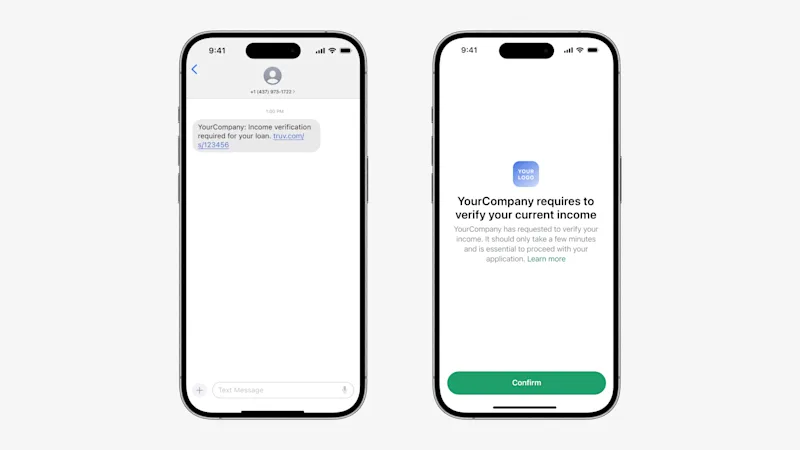
If you choose to send your borrowers SMS notifications to initiate their verifications of income and employment instead of email orders, the text message on both the initial order text and the reminder text is customizable, allowing you to tailor the messaging for on-brand delivery and optimal conversion.
- Landing Page
Customize the details of the landing page shown to borrowers when they click the call-to-action button in the Email or SMS. On-brand and clear communication with borrowers further establishes a cohesive borrower experience.
Customize Truv Reports & Returned Data
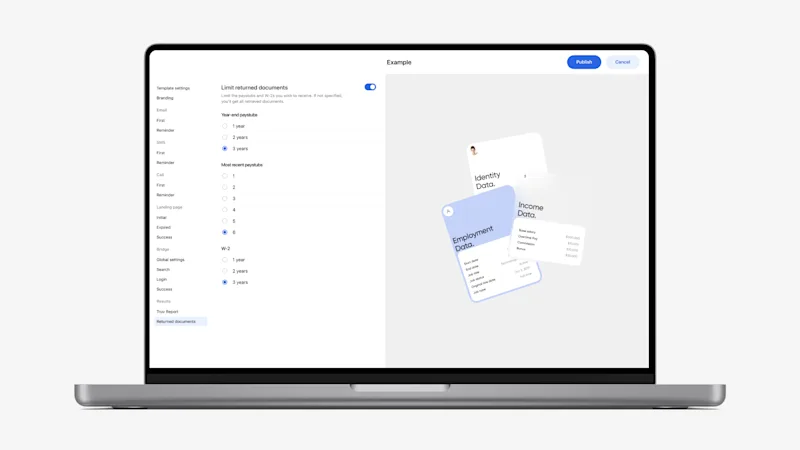
While branding and messaging have been proven to boost conversion, the data returned within Truv Reports is the most critical component to streamlining underwriting decisions. Truv templates are setup for lenders to retrieve the exact borrower details needed to issue loan approvals at speed.
- Truv Reports
To ensure lenders are equipped with the data needed to close more loans faster and easier, Truv Reports can be personalized to your requirements, including the options to include or not include the borrower’s deposit data and the historical pay period summary.
- Returned Data
Depending on your lender’s requirements, Truv allows you to specify the number of most recent paystubs (up to 6) and W-2s, (up to 3), to be included with the report.
Elevate the Mortgage Experience With Truv
At Truv, we understand how important income and employment verification is for your business. That’s why we’re modernizing the verification process and putting the power of consumer-permissioned data at your fingertips.
Customers Come First
Have any feedback for the Truv team? Let us know what Truv can do to best serve you. Your success is our success. We want to hear from you!


