

When it comes to mortgage lending, streamlining a multitude of moving parts leading up to closing a loan is crucial for many reasons, but especially for on-time closings and borrower satisfaction. The easier it is to collect, review, and verify critical information needed for pre-approvals, processing and underwriting, the easier it becomes for efficiency. With automated tasks, notifications, verification orders, and features, loan officers have more time to prioritize building relationships for pipeline growth, requiring less focus on backend processing needs for loan closing.
A Higher Caliber of Automation
With Truv’s integration with Encompass® by ICE Mortgage Technology®, lenders who utilize this loan origination system are on the fast track to streamlined, faster workflows. New enhancements and features, like the CC email feature that Truv offers within Encompass® emails, take automation, transparency, customization to new heights that make the origination process easier for loan officers, operations, and borrowers.
What is the CC Feature for Lenders?
Within our Encompass® integration, automation has always been top of mind. Lenders can utilize the Encompasss® ASO Feature to automate Truv’s direct-to-source verification of income and employment orders, or manually create orders within the interface as needed. Now, we’re taking the automation aspect one step further.
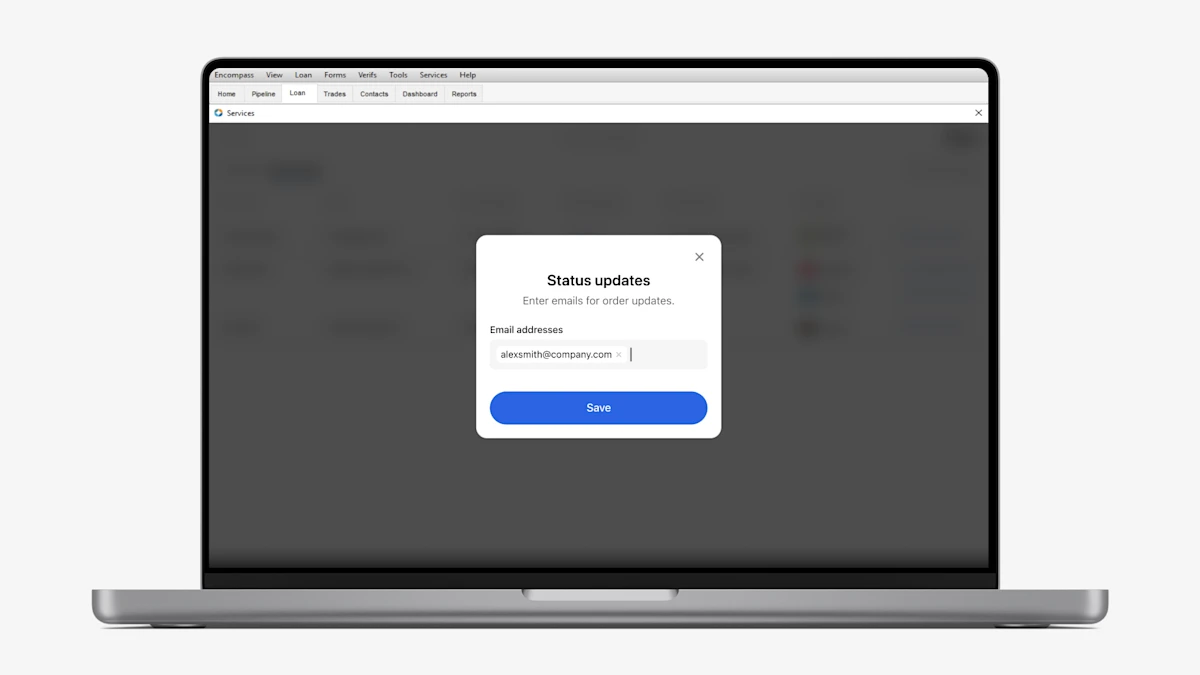
As orders are sent, loan officers now have the option to ensure their team, especially the loan officers, assistants and processors who are associated with the loan, has heightened visibility into order status updates. Now, email recipients of order status updates can be pre-set for the order. This saves time, prevents communication lags that disrupt borrower satisfaction, and boosts transparency for the operations team members who are critical in moving the file quickly through processing, underwriting, and closing.
If you’re ready to see Truv in action or learn about how Truv could work for you, reach out to the team today.
Locating the CC Feature in Encompass®
- Login to Encompass®
- Access Loan Pipeline
- Navigate to Services
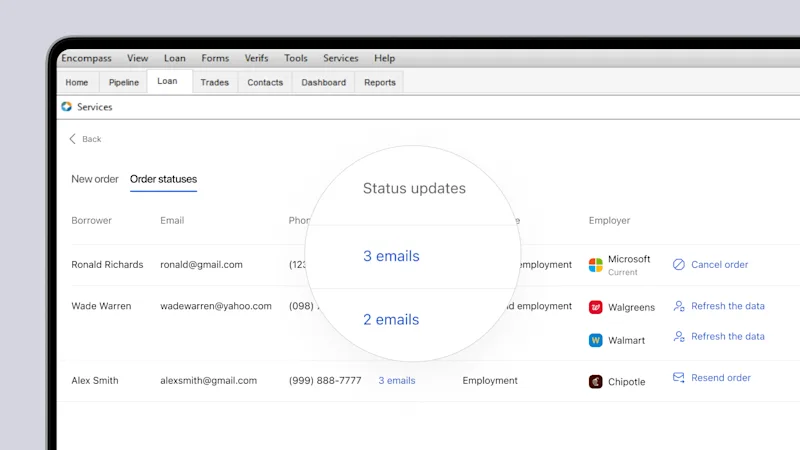
- Locate Status Updates column in the Truv widget
Once the Status Updates tab is open email addresses are editable and viewable. The emails listed within this view are notified for order status updates, including order completed and order canceled notifications.
How to Use the CC Feature
Prior to creating an order, the order manager—whether it be the loan officer, loan officer assistant, or processor—can manually add or remove emails as needed. Up to 15 email addresses can be added to an order. Once the order is submitted, the email recipients will be cc’d on status updates every step of the way.
Customizing Default Role Email Addresses in the CC Feature
As an added automation, lenders can specify roles like the Loan Officer or Loan Processor, who should be CC’d on all orders in Encompass® by default. When this setting is enabled, new Truv orders will automatically pre-populate the corresponding email addresses in the CC feature, in addition to the Order Manager’s. Reach out to the Truv team to configure this on your behalf.
The Benefit to Lenders
1. Enhanced Communication
By ensuring that all relevant parties are kept in the loop with real-time updates, the CC feature enhances communication and reduces the risk of miscommunication or missed updates that could cause delays.
Loan officers can focus more on building relationships and pre-approving homebuyers on the frontlines and handholding homebuyers every step of the way, rather than spending time checking for updates to share with the team.
2. Increased Efficiency
With all order updates being visible to the loan officer’s support team, internal bottlenecks within the workflow are unblocked, paving the path a smoother closing.
3. Customization & Flexibility
The ability to manually add or remove email addresses per order allows for flexibility to meet specific needs on-the-go and ensures that the right people are always informed at the right time to keep the file on a fast track.
In addition, you may let our Implementation and Customer Success team know to customize further to default to loan originators and processors on the loan, in which case the loan in Encompass® has the default status updates set to the assigned roles on the loan.
4. Save Time on Tedious Tasks
Loan officers can focus more on building relationships and pre-approving homebuyers on the frontlines, rather than spending time checking for updates to share with the team.
The Bottom Line
When loan officers have more time to build business and relationships, more loans are closed. Automating tasks, whether it’s the verifications of income and employment order itself or the order status updates recipients, Truv has you covered. Reach out to the Truv Team with any questions.


