
Changelog
Get the latest feature updates in Truv
We have recently updated the navigation bar in the Truv Dashboard to be more intuitive and optimized for usage based on user roles. Additionally, we have updated the color scheme to a darker shade to provide a prettier design. The availability of certain menu options differ by user role.
Here is an example of what an Owner or Admin role would see:
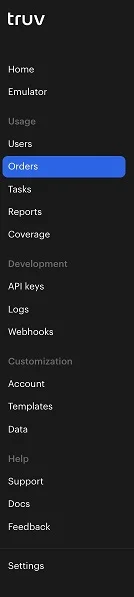
Some highlights:
- The “Reports” menu item is now only available in the production environment. While you are in Sandbox mode, this menu item will be suppressed
- Emulator is atop the menu list and easily accessible so you can quickly play around with the Truv Bridge and see what the Truv experience looks like
- There is a new section for
Customization:- The
Accountmenu item corresponds to global/universal product settings for orders and/or the Truv Bridge - The
Templatesmenu item allows you to create customization templates specific to individual product types - The
Datamenu item allows you to customize individual data fields that are returned in the response from data providers.
- The