
Changelog
Get the latest feature updates in Truv
Loan application number: The loan object on an order now accepts an application_number (the POS file number) as an alternative to loan_number. A loan must supply at least one of the two identifiers; loan_number is no longer required on its own. The new field is returned in the loan object on order create, retrieve, and list responses, so if you validate responses against a strict schema, update it to allow application_number.
This supports POS-first workflows where the file exists before the LOS has assigned a loan number. If you currently send a placeholder in loan_number, we recommend moving that value to application_number and populating loan_number only once the real one is assigned. In the near future, loan_number will no longer be editable once set, and attempts to change it will be rejected. That change will be announced separately.
See the Loan object reference for the full loan schema.
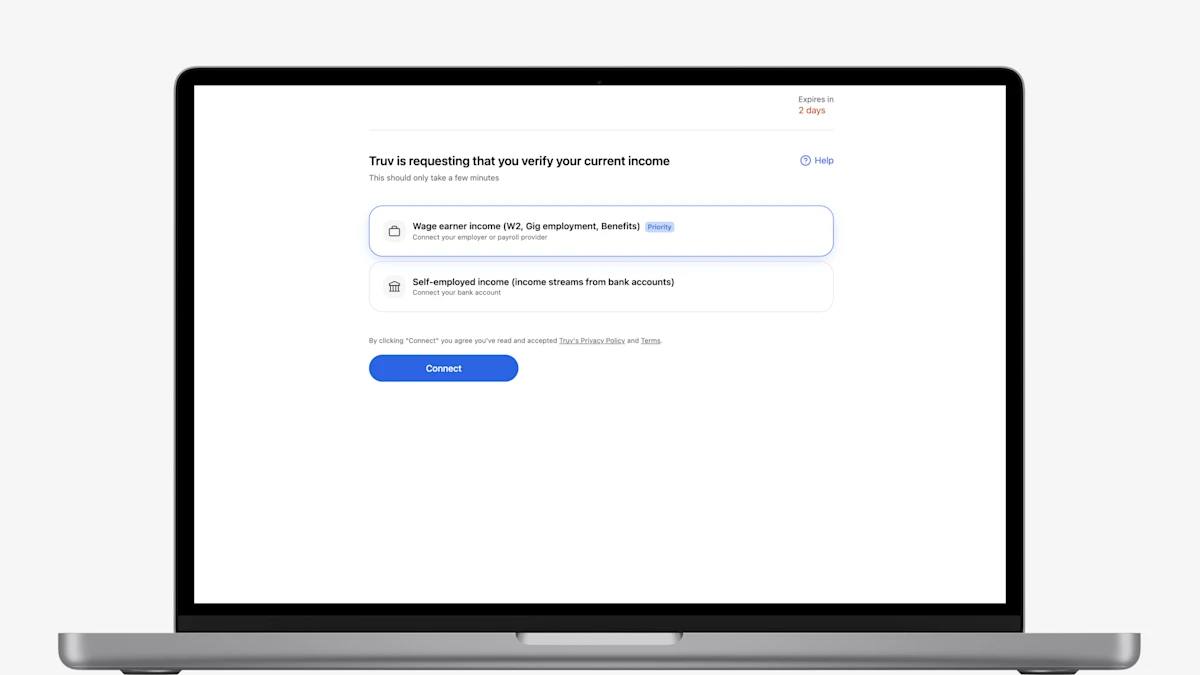
- Redesigned Truv Orders Landing Page: The Truv orders landing page has been refreshed and redesigned to improve conversion and client experience. The updated landing page will be live on September 1, 2026, available to enable upon request for pilot before September.
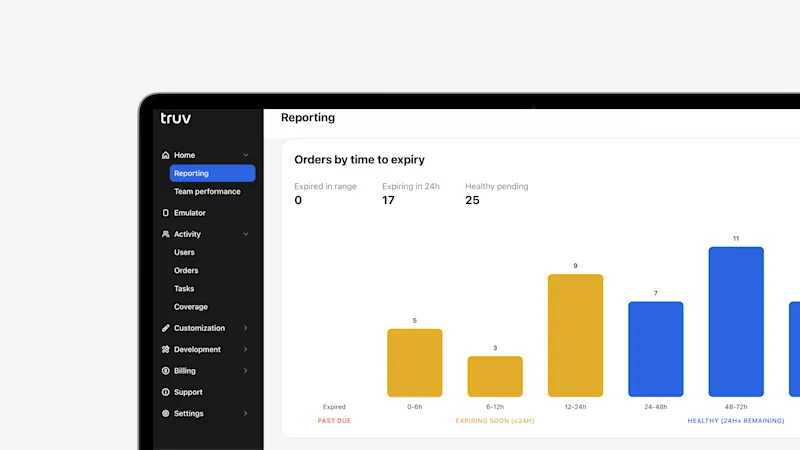
- Enhanced Reporting Tab in Truv Dashboard: For all Truv clients, in Truv Dashboard > Reporting tab, you can now view breakdowns of orders by time to expiry, filter by multiple data sources at once, and see details on error distribution including the top five error messages by category.
- Expanded Order Expiry Settings in Truv Templates: Clients can now customize how long orders remain active before automatically expiring when at least one employer or account has been completed but the user has not clicked Finish to share their data. The default expiration remains 24 hours, but clients can configure a shorter or longer timeframe based on their workflow.
- Email Title Field in Truv Templates: Truv Templates now include a Title field for first and reminder emails, giving you control over the subject line clients see.
- New Order and Refresh Grouping in Truv Dashboard: In the Orders tab, an initial order and all of its subsequent refreshes are now grouped together, so the full history of a single verification appears in one place.
List orders endpoint: You can now retrieve a paginated list of your orders with the new List orders endpoint (GET /v1/orders/).
The endpoint uses cursor-based pagination and supports filtering by date range, status, product, source, and more, plus full-text search across fields like order number, loan number, and applicant name. This lets you pull orders in bulk without knowing individual order IDs.
See the List orders API reference for the full request and response schema.
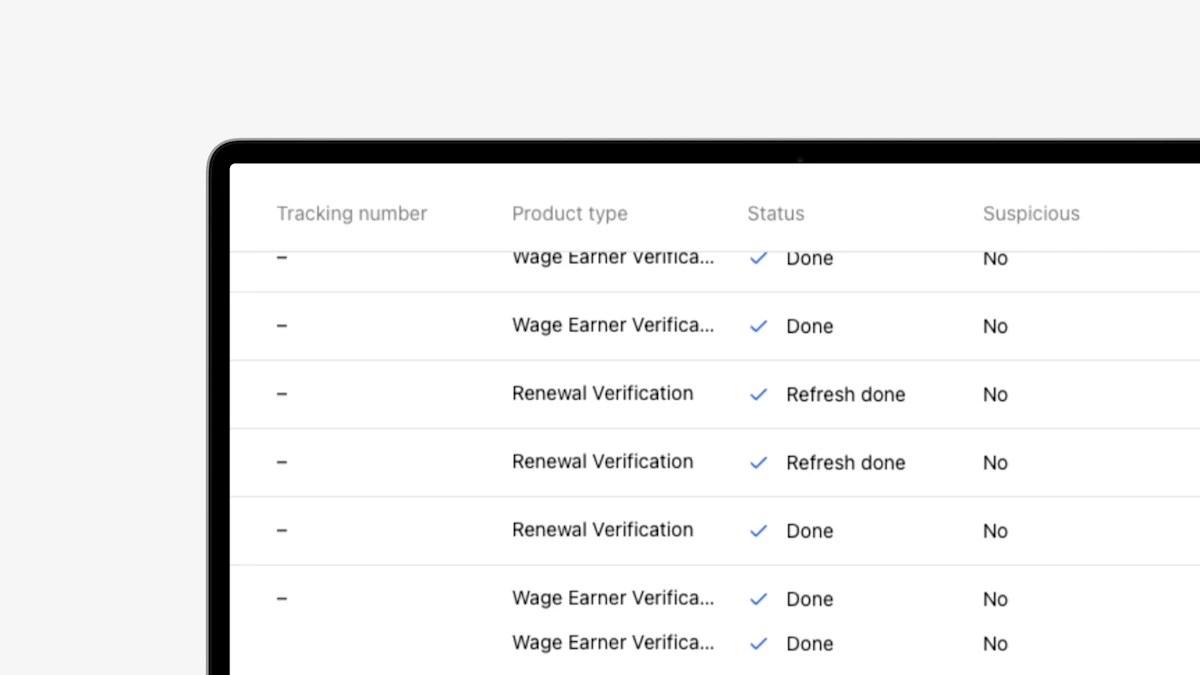
- New Order Status Column Tags in Truv Dashboard: In the Truv Dashboard Orders tab, refreshes and initial orders now display distinct labels in the Status column, making it easier to tell them apart at a glance.
- New Doc Upload Template Settings: To align with the upcoming launch of Truv's new Doc Upload, we updated Truv Template settings for streamlined setup and consistency with the client-facing experience.
- Public Sector Client-Reported Income Section in Truv Dashboard Order Results: For public sector, in Truv Dashboard Orders information, we've added a client-reported income section for caseworker review.
- Enhanced Order Actions in the Orders Table: The Orders table now provides the full set of available order actions directly from the action menu. Users can access reports, invoices, downloads, and other order-specific actions without navigating to the Order Details page, creating a more consistent and efficient workflow.
- Template Filtering by Product Type: In the Truv Templates tab, lists can be filtered by product type, now automatically updating based on the selection(s) in both Sandbox and Production.
- Ability to Manage Truv Changelog Email Notifications: A new notification preference allows Truv Dashboard users to opt in or out of Changelog emails. To update your preference, navigate to Settings > Notifications.
- Redesigned Returned Documents Limits Form in Truv Templates: The Returned Documents Limits form has been redesigned with a more compact, streamlined layout, making it easier for mortgage lenders to navigate and configure document return settings while maintaining the same functionality.
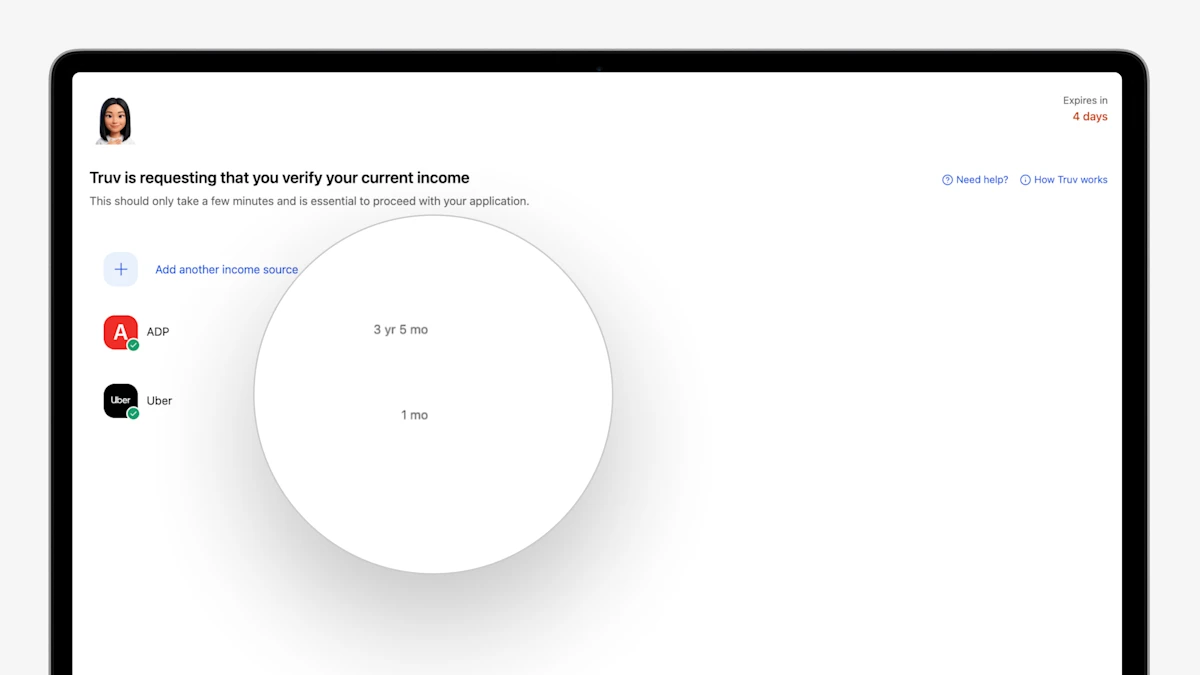
- Show Connected Employment Duration to End User: In the order landing page, when an end user connects to an employer or payroll provider, Truv now shows a summary of the employment history to the end user. Minimum requirements can be set in Truv Templates.
- Auto-Prompt Client to Connect Additional Required Data: In the order landing page, when an end user connects to an employer, provider, or financial institution, Truv now flags next steps to add additional sources if employment duration requirements were not met.
- Auto-Open Controls for Combination Products: For orders that have combination products, you can now select one product to auto-open for the end user, guiding the borrower and improving conversion.
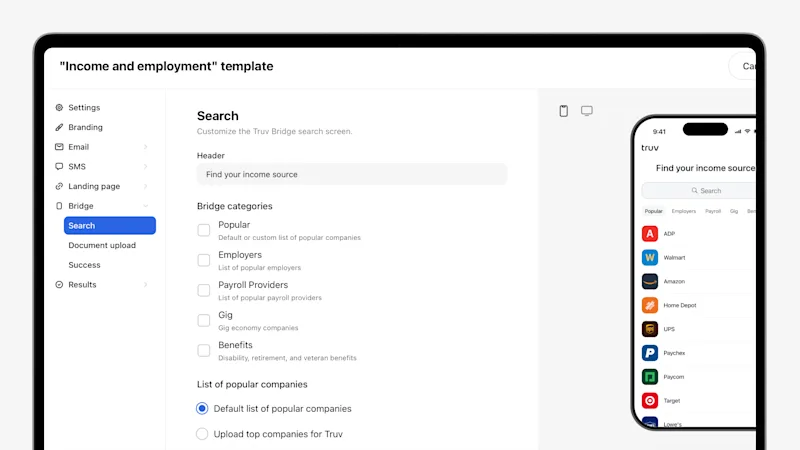
- Enhanced Truv Template Design: Truv Templates have been redesigned with a new layout, additional fields, expanded customization, and updated field grouping for all Truv customers. Setting up and managing templates for Truv clients is faster, more flexible, more intuitive, and easier to use.
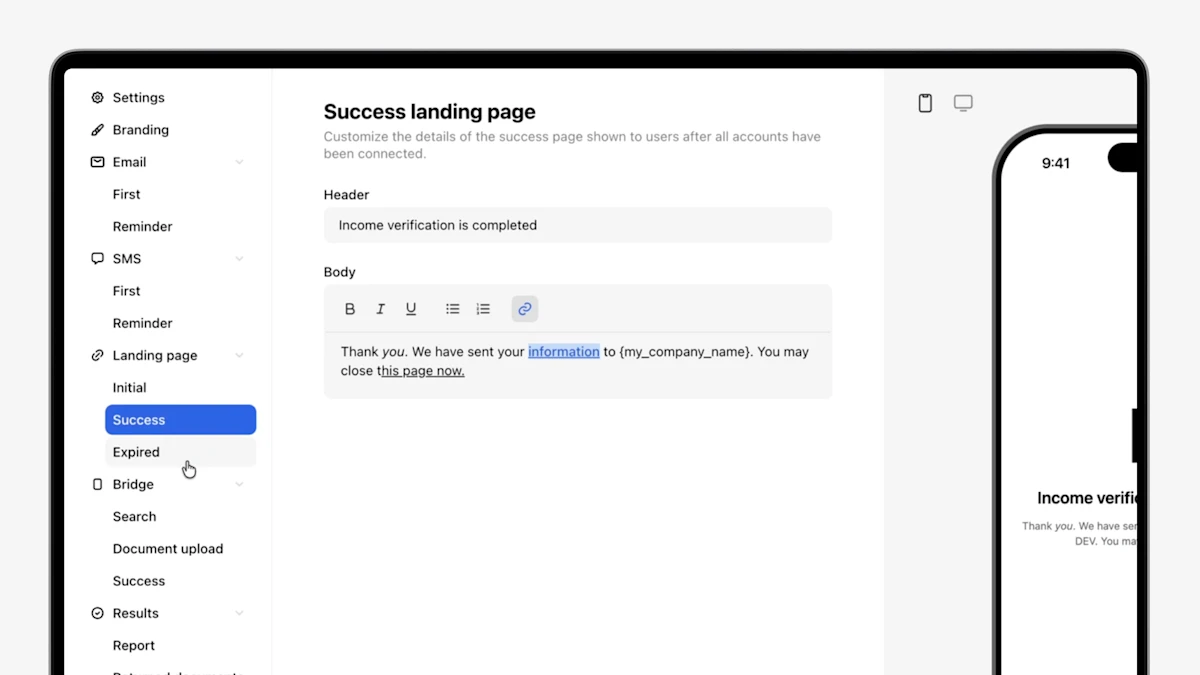
- Rich Text Support in Orders Landing Page: The orders landing page now supports rich text formatting, giving you more granular control over how your end-user experience looks so you can tailor every detail to your brand and preference. Use bold, italics, links, and other styling options to craft clearer, more compelling messaging that drives stronger conversion.
- Auto-Completed Orders for Partial Connections: To improve conversion by capturing partial connections that would otherwise be at risk of drop-off, now when an end user connects one employer, provider, or financial institution in an order but not the others, Truv auto-completes the order in 24 hours. If you need to verify additional sources that were not connected, create a new order with the same
external_user_idand Truv will recognize that the connections belong to the same end user. Configuration available by request.
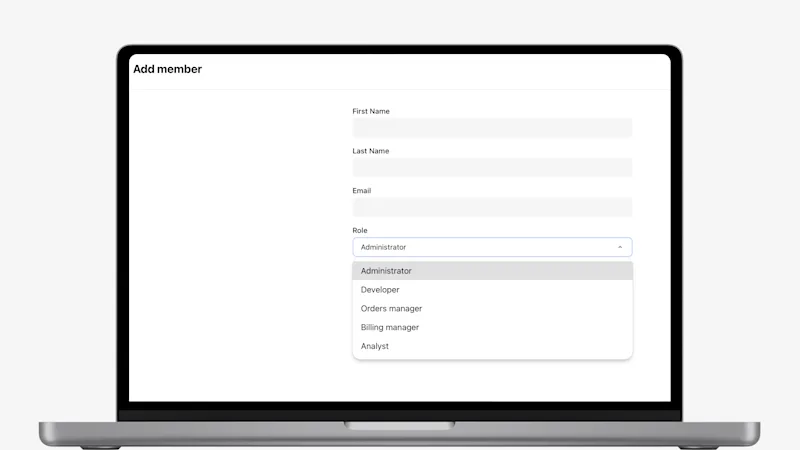
- New Analyst Role Available to Assign to Team Members: In Truv Dashboard, under Settings > Team, your admins now have the option to assign team members to a dedicated role with access to Truv reporting and insights.
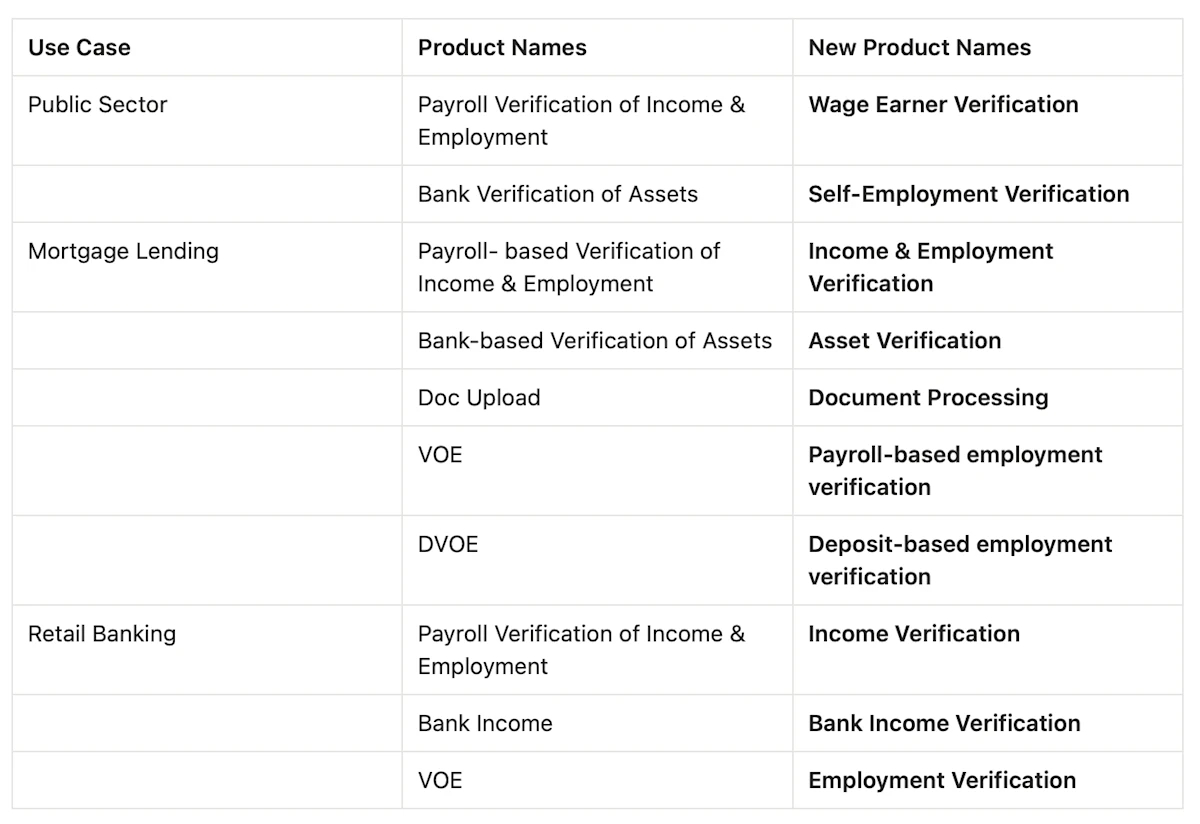
- Introduced new product names for Truv’s verification suite: Truv has introduced new product names for our suite of verifications that will display in Truv Dashboard, Truv templates, Truv Create order form, Truv orders, and integrated systems.
Added order retrieve endpoint to return additional financial account details: balance (the current account balance, when available), owners (list of account owners), and bank_income_sources (income sources derived from transaction data, when available). All new fields are read-only and nullable.
Available in:
- Retrieve an order endpoint
- 508 Compliant Orders Landing Page & Doc Upload Product: Truv's Orders workflow has been refined to support multiple modalities for accessibility, including keyboard + screen reader navigation, voice command with numbered overlays, and grid-based spatial navigation. 508 compliance also extends to our document upload product, empowering public sector clients with accessible verification experiences.
- Expanded Multi-Lingual Support: Truv expanded support for threshold languages within the Truv verification experience. In addition to our existing multilingual coverage, we now support Portuguese, Ukrainian, Mandarin, and Mien, helping agencies better serve diverse populations while maintaining a seamless, compliant user experience.
- Support deep-link and user-defined orders: Some customers know some employers or financial institutions that need to be verified, but also want to allow the applicant to search and connect additional ones. Truv now supports both types of connections in an order. Reach out to Customer Success to enable.
- Added Tidalwave Filter Options in Truv Dashboard: Tidalwave POS now passes a ‘Tidalwave’ source value for orders created in their system, which can be used as a filter in the Reporting and Orders tabs of the Truv Dashboard.
- Updated VOE Template Default Verbiage: To improve alignment between default templates and most common use-cases, we updated the VOE template default verbiage to reference employment verification as opposed to an employment history verification from a prospective employer.
- The Truv Order Landing Page and Truv Bridge can now be automatically translated into one of 15 languages (Armenian, Khmer, Chinese, Hindi, Hmong, Japanese, Korean, Laotian, Mien, Punjabi, Russian, Spanish, Tagalog, Thai, and Vietnamese). The language can either be set via the
localeparameter in the Create an Order endpoint, or automatically detected based on the user’s device language.
- A new field
loan.is_closedwas added to indicate when a loan has been closed; it’s now supported in the Cancel Order, Update Order, Create Data Refresh Order, Retrieve Order, Orders Lookup, and Create Order endpoints. - The request body now supports the
notification_settingsproperty in both the Create Order and Update Order endpoints.
- For customers who enter a custom field during order creation, we have added this to the Order status update email subject and body. This allows easily searching inboxes for a status update by the custom field value.
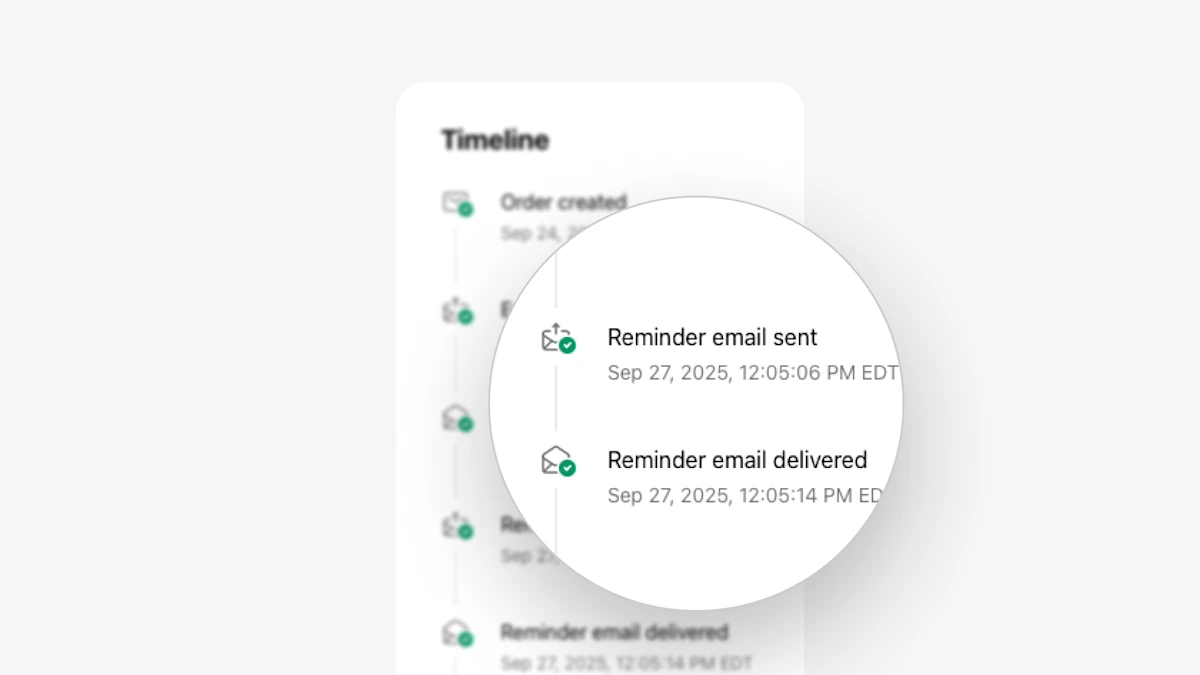
- In Truv Dashboard Orders, we have migrated the Timeline to our Retrieve events for an order public endpoint and made the following UI improvements:
- Timeline now shows when reminder notifications are sent, delivered, and opened by the end user via email and/or SMS.
- Showing terminal order statuses at the employer or provider-level, to clarify exactly what part of the order was completed, expired, canceled, etc.
- Created a consistent formatting for events to include the employer/provider, timestamp and outcome in each case where available. Previously some key events like ‘Login attempt’ were missing timestamps.
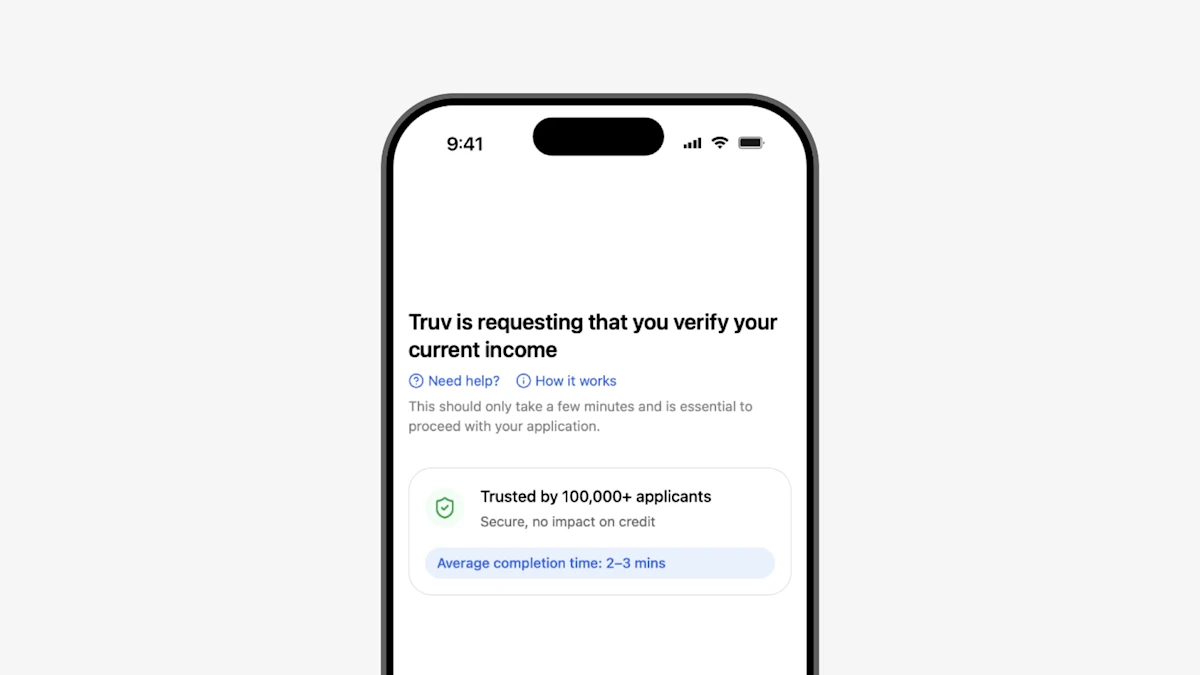
- Improved order preview: The order preview during Dashboard order creation shows what the end-user will receive when they receive and open a Truv order. We updated the landing page preview to show a new version of the landing page that includes an expiration, trust points, and expected completion time.
- Added re-authentication email notification on refresh orders: For customers that create an order and need to refresh the data later, Truv tries to retrieve new data using existing credentials first, then reaches out to the applicant for re-authentication if that fails. Truv has added an email notification to notify the Order Manager and other status update recipients when the re-authentication request has been sent to the applicant, to create transparency and enable better coordination for these cases.
- Ability to cancel refresh orders in ‘Pending’ status: For customers who create orders via Truv Dashboard, we have added the ability to cancel refresh orders that are pending. When a refresh order is canceled, it will also stop additional reminders from being sent to the applicant.
- Updated Coverage Indicators for financial institutions: We have added financial institution coverage indicators to improve visibility into likelihood of successfully connecting. In the Dashboard → Coverage tab under ‘Financial accounts’, users can now search and see the success rate for any financial institution. Additionally, in the Dashboard → Orders tab, when adding financial institutions to an Assets or Transactions order, we show the success rate.
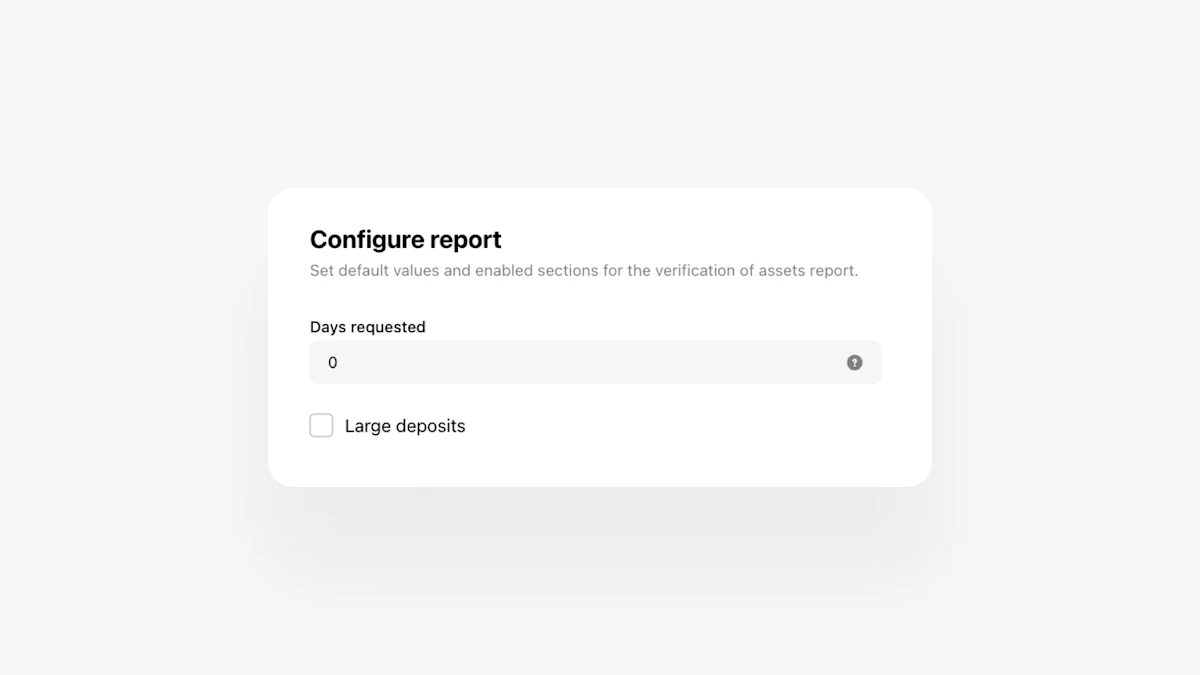
- Customize ‘Large deposits’ threshold for VOA Reports: For some loan types, lenders wanted the ability to return all deposits in the ‘Large deposits’ section of the VOA report.
- We now allow allow “0” dollars for the ‘Large deposits’ threshold, which will return all deposits across connected accounts.
- You can also hide the “Large deposits’ section completely by ensuring the box is unchecked.
- New tags for undisclosed debts added in VOA Reports: To improve visibility into potentially undisclosed debts in Truv’s Verification of Assets report, we added a set of tags in the ‘Transactions’ section for BNPL, Payday Loan, and P2P transactions. If we detect a transaction in any of these categories, it will have a tag in the PDF and Dashboard Report.
- ‘Days requested’ and Financial accounts specification added for VOA Reports: For users who create orders via Truv Dashboard, we have added the ability to specify days requested and financial institutions that should be connected.
- ‘Pending’ state added for Truv invoices: For customers who have enabled Truv order invoices, we have added a pending state to the Dashboard to show when an order invoice is in the process of being generated. Previously, nothing was shown, making it unclear while the invoice was loading.
- Ignore capitalization while de-duplicating emails: Previously emails with the same characters, but different capitalization, could be submitted for status updates causing an error. Now we deduplicate emails correctly, ensuring emails are sent in this case.
- VOA and DVOE report disclaimers: To provide clarity to loan teams while reviewing the VOA and DVOE reports, we added disclaimers to the Large deposits, Account owner information, and Transactions sections. The disclaimers clarify that no data for the corresponding section was available for the period requested.
- Added pending transactions to assets reports: To give clients additional visibility into deposits and withdraws, we have included pending transactions in the VOA and DVOE report, with a ‘pending’ label under the date field.
- Renamed ‘Identity’ section in Truv VOA/DVOE reports: Since this section includes data submitted during order creation instead of returned from the provider, we renamed the section from ‘Identity’ to ‘Borrower/Applicant info’.
- Hide large deposits section in templates for verification of assets report: For clients that don’t want to see the large deposits section of the VOA report, we have added a toggle in Truv Dashboard Customization → Templates. If a template has Assets product type, there will be a ‘Large deposits’ toggle in the ‘Report’ section to control whether this section is included in the VOA report or not. If the section is disabled, the field will also be hidden from Dashboard and Encompass order pages.
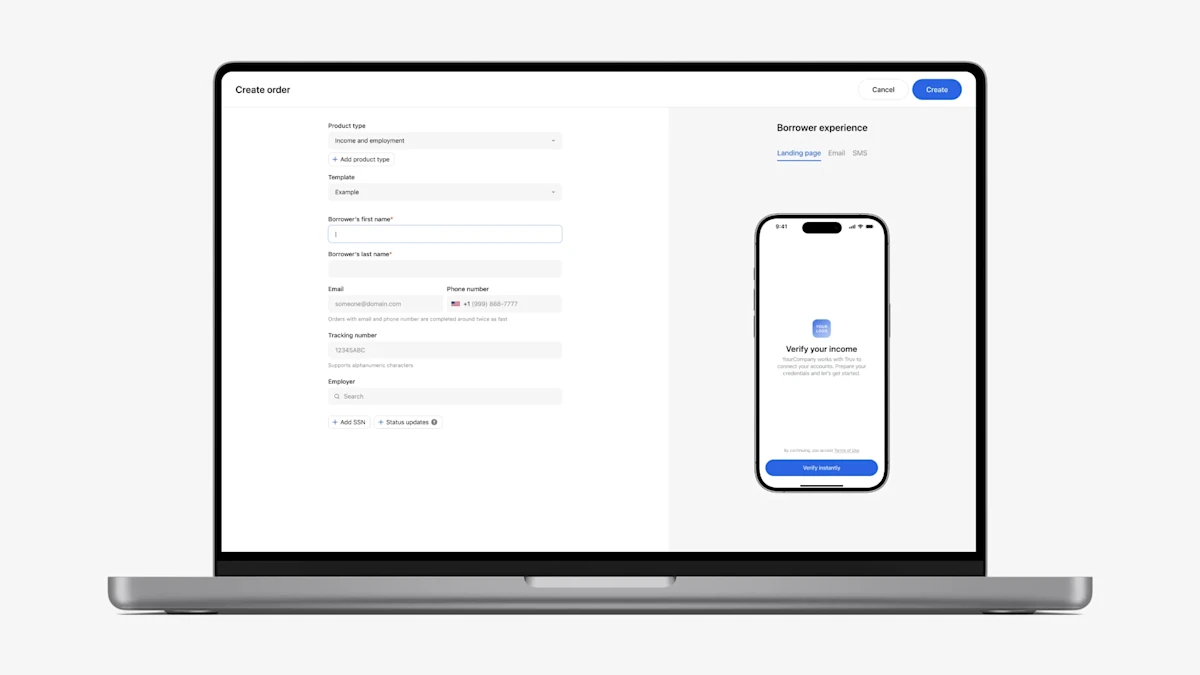
- Improved Order Creation Experience in Dashboard: We converted the order creation pop-up into a full-page form in Truv Dashboard → Orders → Create order. This ensures clients have enough space to fully customize each order and can easily visualize the request and preview without additional clicks.
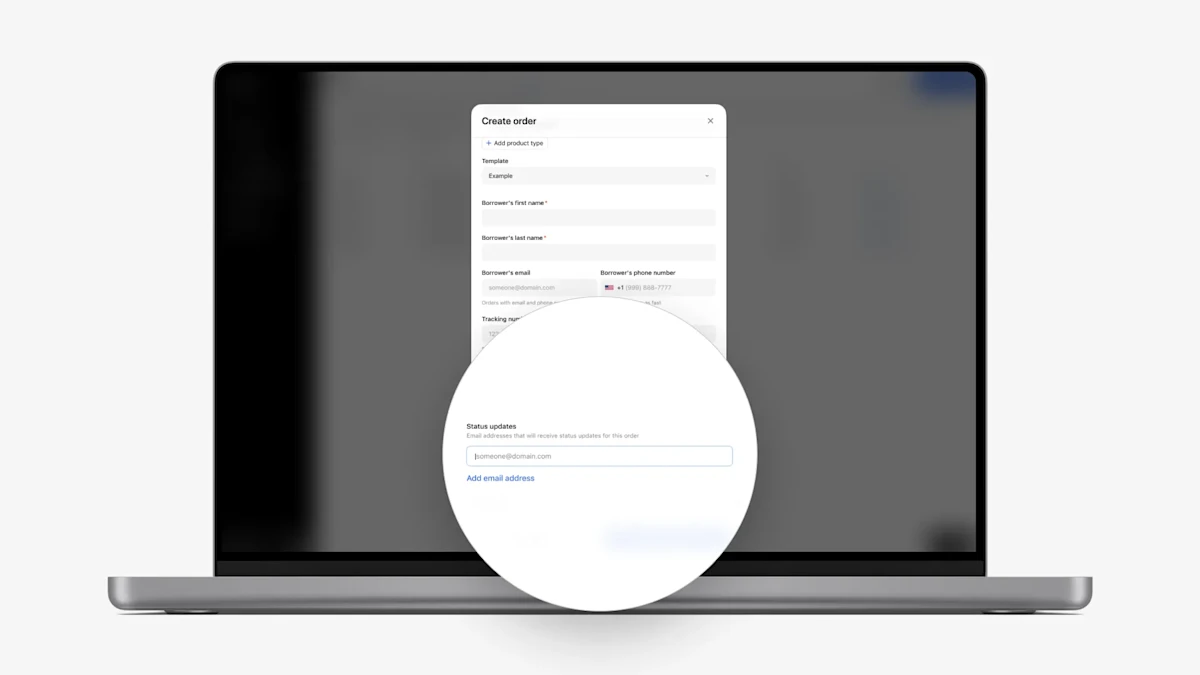
- Added ‘Status updates’ fields to Dashboard order creation:
- To give clients who create orders in Truv Dashboard more control over status update emails, we added a ‘Status updates’ field to the create order form. Up to 15 email addresses can be added for recipients who should receive status updates in addition to the Order manager or Alerts email. Roles added here are visible in a new ‘Status updates’ field under the ‘Order details’ section.
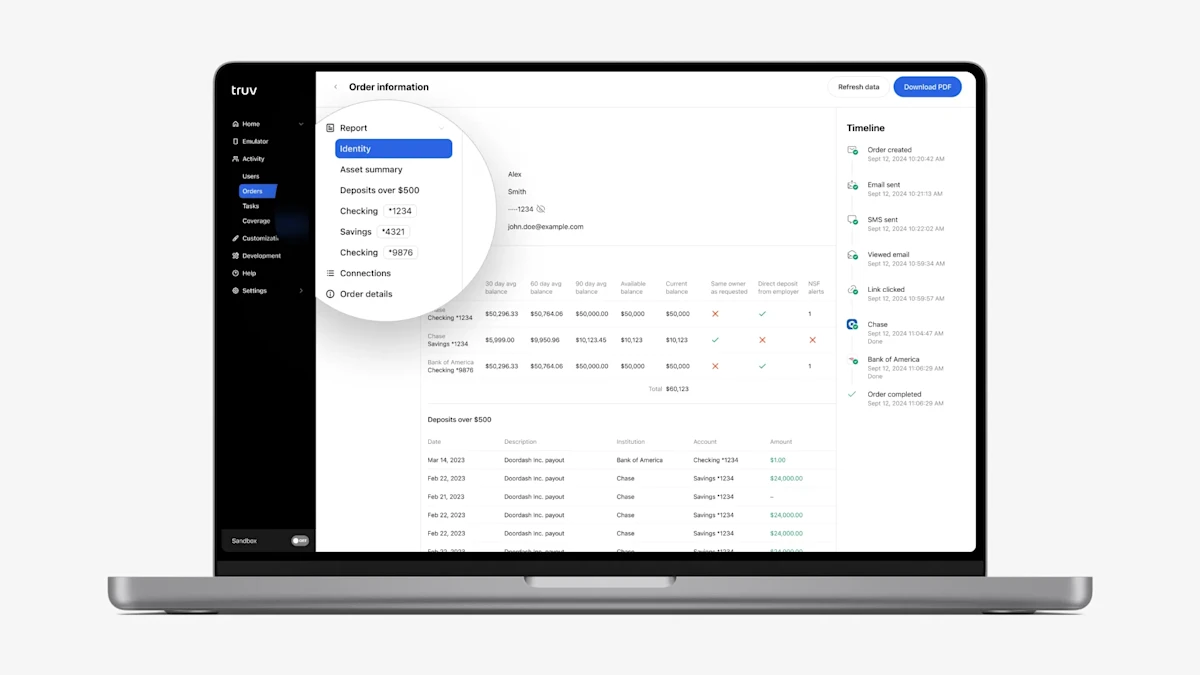
- Assets product in Truv Dashboard → Users, Orders: In the Truv Dashboard for Assets reports, we previously showed “Bank accounts” in the submenu and connected financial institutions as tabs, which was easy for users to overlook in cases multiple institutions were connected. To make the connected accounts more obvious and easier to navigate, we replaced the “Bank accounts” submenu item with placeholders for each connected account. Also, we now list all connected financial institutions, so there is no need to switch tabs in the report to see all the data.
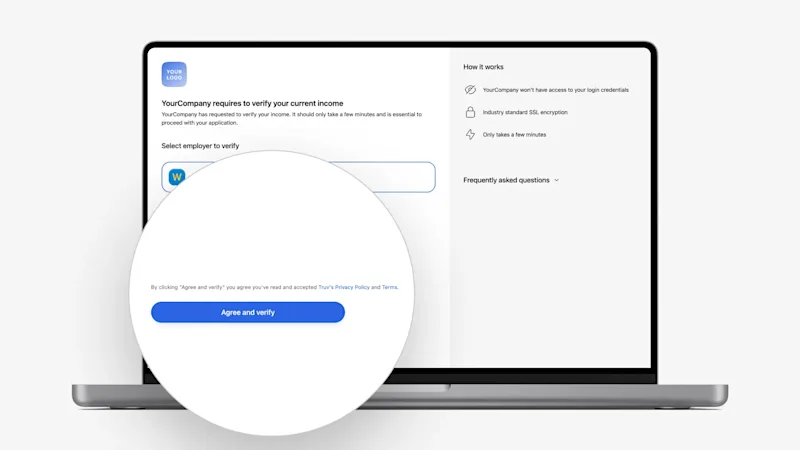
- Compliance update: To ensure compliance with legal requirements, we improved the acceptance terminology for all clients:
- The confirmation button text has been changed to
Agree and verifyfor income, employment, assets, transactions, and insurance on both platforms (desktop and mobile). - The agreement text on the Orders Landing Page above the Agree and Verify button has been updated to
By clicking "{{button text}}" you agree you've read and accepted {{clients user agreement}}, Truv's Privacy Policy and Terms.
- The confirmation button text has been changed to
- Order Page width: To improve the appearance on wide screens, the Orders page width is now limited to 1502 px.
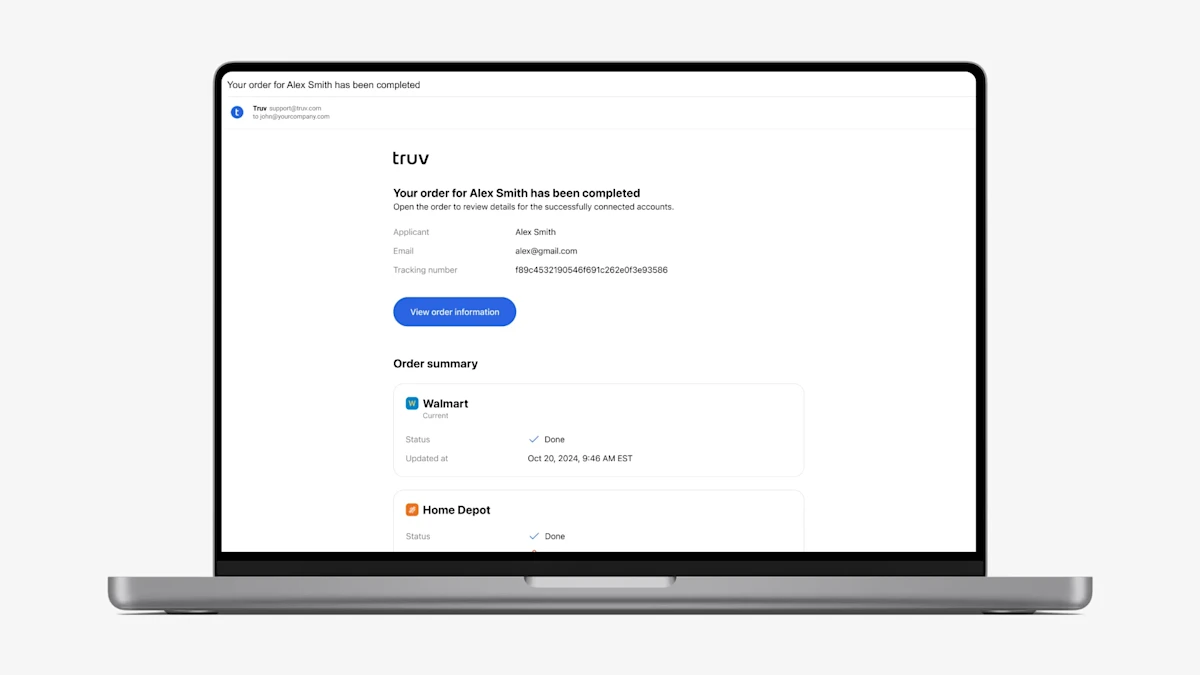
- Order-level status update emails: For Truv Orders clients, we previously sent a status update email to the Order Manager and any other CC’d roles whenever a suborder was moved to a terminal status (Completed, Expired, Canceled, Skipped by user, No data). This created a large volume of status update emails, since one order with three employers would have three separate status update emails. Additionally, if part of an order was completed, no information was shared about the remaining parts of the order, leaving Order Managers in the dark. To solve these problems, we introduced order-level status update emails.
- Now, if part of an order is moved to a terminal status (Completed, Expired, Canceled, Skipped by user, No data), we will wait 2 minutes to check if updates happen on the rest of the order. Once we detect no further updates, we will send a single email summarizing the status of the entire order.
- To make status updates more actionable, we include the last task status and number of attempts for the corresponding employer or providers in the order that are still in Pending, Sent, or Skipped status. With this information, Order Managers can decide whether to help the user complete the remaining parts of the order or pursue an alternative solution.
- Lastly, to provide more context and make the emails more searchable in your inbox, we added the following fields: End-user email, Loan number or Tracking number, Order ID, Source, Order expiration time
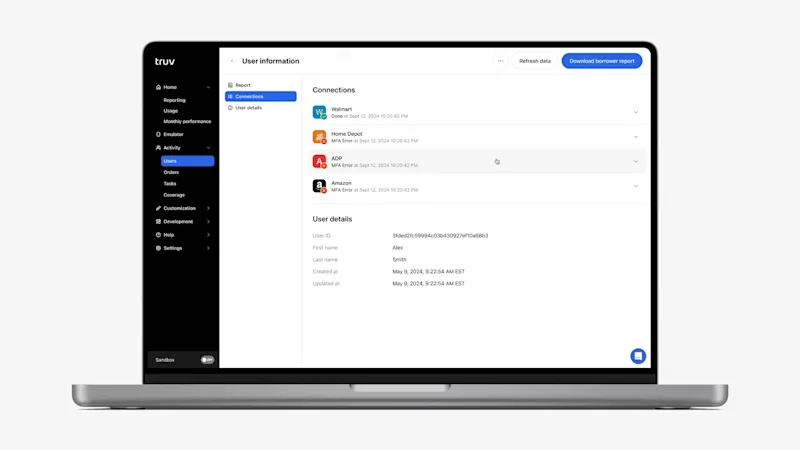
- New ‘Connections’ section added to Orders tab and Users tab (beta release): To increase transparency on progress and connection attempts for Orders and Embedded clients, we have added a ‘Connections’ section to the Truv Dashboard in the results. Open the Orders tab or Users tab (beta release only) in the Truv Dashboard, click a row, then navigate to the Connections section by either selecting the submenu or scrolling to below the Report. The section will show all attempts grouped by company or provider for the current product type. For each attempt, we show the company or provider, latest attempt result, updated at, tracking info, and a link to the corresponding attempt tasks. With this information, Truv Dashboard users can get visibility into login attempts that have not been successful. Previously this information was missing, making it hard understand the customers progress and help them through the process.
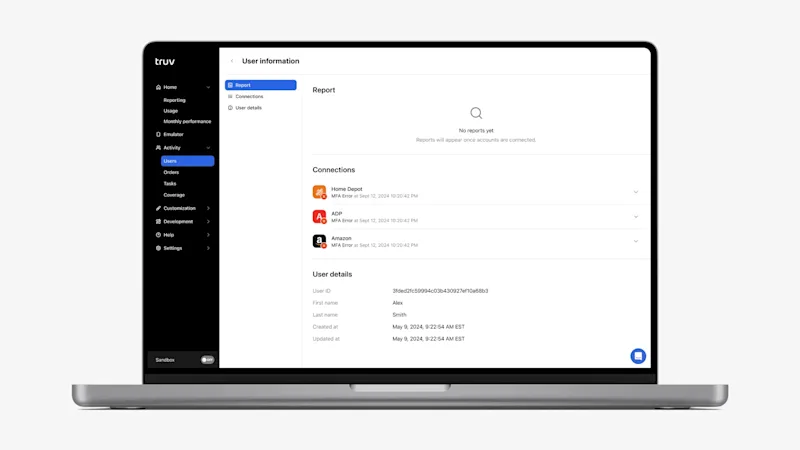
- Added Report and Connections placeholders to Orders tab and Users tab (beta release): Previously we only showed Order details or Users details for end-users that did not have any successful connections or reports. This made it unclear what should be returned where once a Truv request was completed. To solve this problem, we added a placeholders for the Report and Connections sections on the submenu and results section for both Orders and Users (beta release). Once results are available to show, we replace the empty states with the returned results.
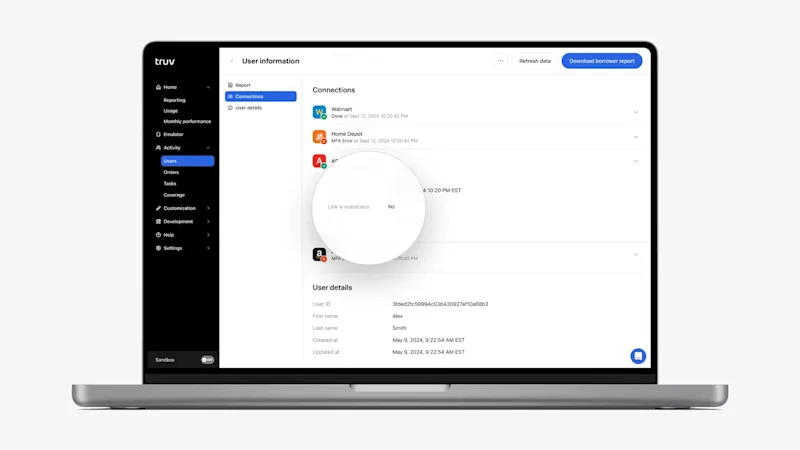
- Moved Link is suspicious field to the Connections level: To help identify fraud cases, we moved the ‘Link is suspicious’ field to the Connections level. Previously we showed a ‘Link is suspicious’ field in Truv Dashboard under Order details or User details. This field shows a Yes / No value depending on whether the SSN submitted to Truv matches the SSN returned from the connected provider. Since there can be multiple providers per order or user, it didn’t indicate which one exactly had the mismatch. To solve this we moved this field to each employer or provider under in the Connections section, so it indicates which exactly has the mismatch.
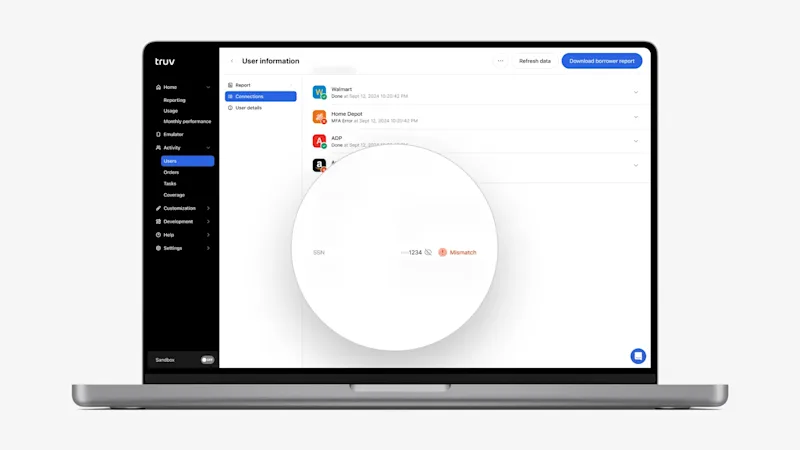
- SSN Mismatch indicator if a Link is suspicious: To further help identify fraud or suspicious cases, we added a red ‘Mismatch’ indicator next to the SSN field in Order details and User details in the Truv Dashboard. For the connections in the User or Order, if any have ‘Link is suspicious: Yes’, then a red ‘Mismatch’ indicator will be added next to the SSN field
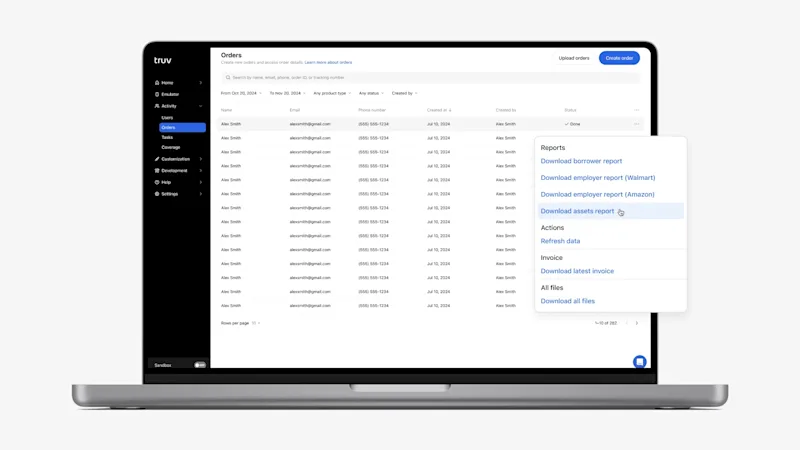
- Transformed action buttons into an ‘Actions’ dropdown: Previously we showed a variety of icons across tables in the Truv Dashboard for available actions. This created inconsistency in the experience and limited the number of actions that could be shown for each row. To create a consistent experience and make the Dashboard more intuitive, we have added a three dots ‘Action’ column to the end of tables (Orders, Templates, Webhooks). Once clicked, it opens up a dropdown with available actions grouped and summarized in plain text. Additionally, this column is now fixed in the tables, which can be horizontally scrolled to show additional columns.
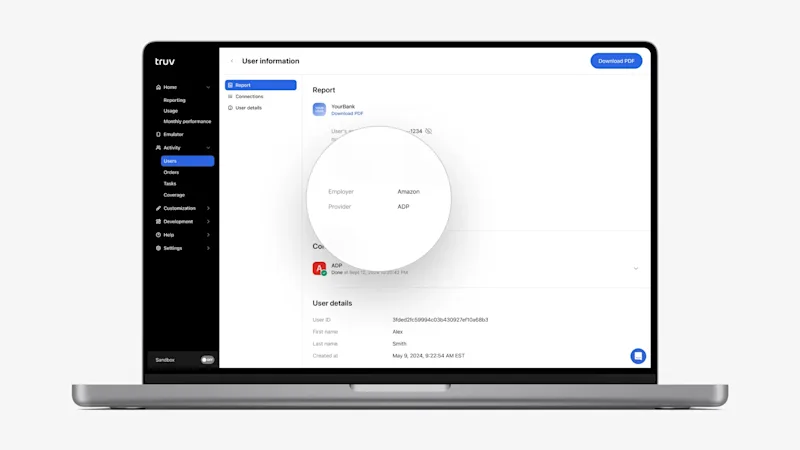
- Added Employer and Provider to the Report and for DDS and PLL products: For clients that used Direct Deposit Switch (DDS) and Paycheck Linked Loans (PLL) products in the Truv Dashboard, we previously only showed the connected bank and account information. There was no information about the employer or payroll provider that was connected to initiate the deposit switch or payment. Now in the Truv Dashboard in Orders and Users and in the Downloadable Reports (Download PDF), we include the connected Provider and Employer (if available).
- The corresponding changes have been implemented for the Direct Deposit and PLL Reports API. For details, refer to the API updates – December 2024
- Additional Error Distribution statuses in Dashboard Reporting: In Truv Dashboard in Home → Reporting tab, there is an Error distribution chart that shows a breakdown of login errors by type. We have added four additional error types that were previously missing: Account locked, Not supported, Session expired, Unable to reset.
Dashboard bug fixes
- For Orders clients, we previously showed both the Orders and Users tab in the Truv Dashboard. Since these tabs showed essentially the same information, we removed ‘Users’ tab access for companies with this workflow type to prevent confusion.
- There were some cases where suborders could be set to Error while the corresponding tasks were set to Done. These cases have been resolved so the suborder has the right status based on its task.
- New order creation form in the Truv Dashboard that includes reordered fields based on importance, employer coverage visibility, borrower/applicant preview, and a notification method reminder. See our blog post for more details.
- To improve the borrower/applicant experience and conversion, we increased the size of the ordering client’s logo to 72 pixels high in the email notification sent to the borrower/applicant.
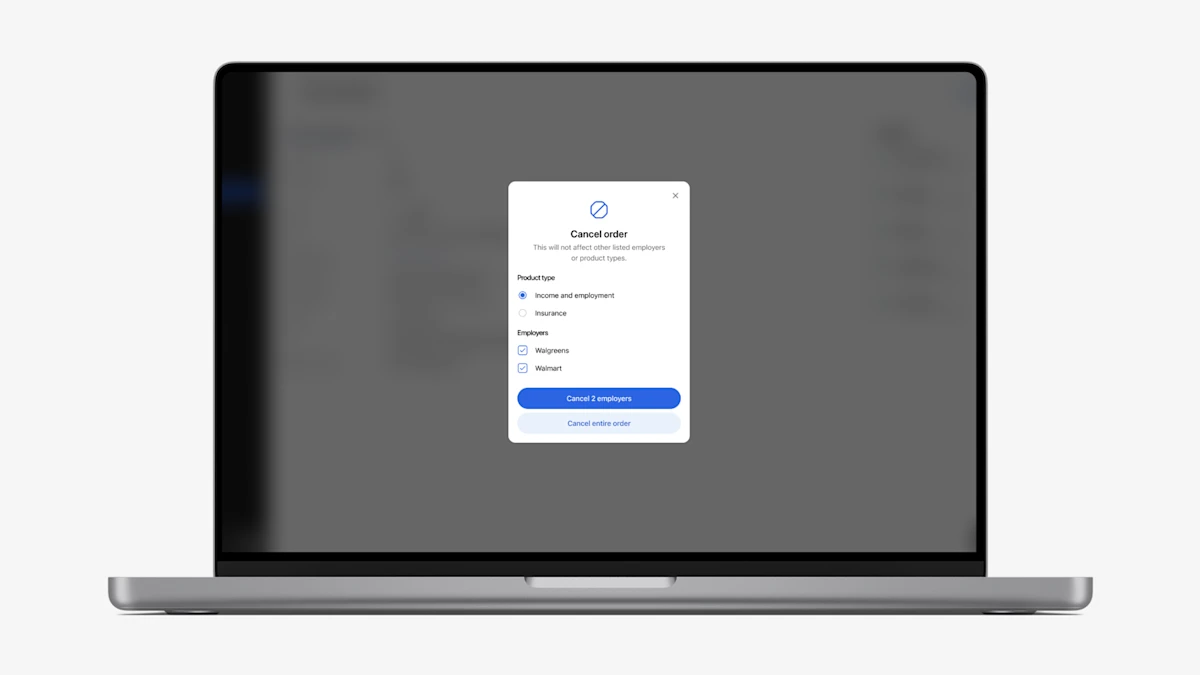
- For orders with multiple products and/or employers, we’ve made the order cancellation pop-up more flexible to allow for cancelling specific products or employers. Previously users could not cancel specific products if there were multiple.
- Borrowers and applicants using older versions of Microsoft Outlook would receive poorly formatted order email notifications. We corrected the majority of formatting issues across these cases, with only minor inconsistencies remaining due to Outlook limitations.
- Based on the lifecycle of the loan, we noticed that some loans were getting triggered for borrower authentication automatically for re-verifications. This can be challenging when your loan officers are trying to close a loan and add additional delays. In order to address this issue, we have now added an additional configuration for LOs to approve or cancel borrower notifications. Using an additional popup window now LOs can choose an option to notify the borrower or cancel it during the refreshing data. Please reach out to implementation@truv.com to configure this setting.
- The Order Details page now includes a link to all related tasks for the order, enhancing accessibility for the end user.
- Added the ability to refresh the order data for Insurance and Assets verification, which was previously only available for VOIE and VOE.
- Order response view changes: Truv introduced a new experience for our Dashboard users to view and navigate responses retrieved for Orders. This was done to simplify navigation and readability especially in the cases of multiple employers. We have introduced a sub-menu and critical details along with clickable categories from the sub-menu.
- Truv now has the ability to display Borrower level reports along with employer level reports, providing more details to LO and processors as borrowers complete verification. Borrower reports are generated when the order is complete and can be used to submit to Fannie Mae and Freddie Mac.
Updated Orders responses in Truv Dashboard
- Order responses in Truv Dashboard will now have Current employer indication and dates of employment for quick overview
Sub-menu for Orders in Truv Dashboard
- Easier navigation and reading of responses, with sub-menus you can click different employer or different sections under one employer
- You can click on Identity, Employment, Employer, Income etc
Masking Date of Birth(DOB) on reports
- Truv is now masking Date of Birth(DOB) in Orders and reports
Loan number in Order view
- For Encompass clients, in Truv Dashboard -> Orders, Loan Number will be displayed as a column instead of Tracking Number (Truv unique identifier)
Make your operations team more effective by uploading hundreds of orders in Truv Dashboard at once. Simply follow the below steps
- Navigate to Truv Dashboard -> Orders,
- On the top right corner click on Upload Orders
- Select the product type from the list of available product types
- Download the CSV template, fill with borrower information
- Upload the template and VIOLA!
Tailoring your Truv orders is now a breeze. Our customers can create templates for unique customizations tailored to their clients or products. When creating an order, selecting from a vast array of hundreds of templates has never been more accessible.
We’re enhancing the clarity and efficiency of our order form with some thoughtful updates.
- Introducing new labels, including a
Requestedlabel positioned directly beneath the requesting company’s name in the responses. This improves readability for Loan Officers especially in scenarios involving multiple employers requesting data for a single connected account or requests that lead to multiple jobs being returned with user authenticating once to the provider. - Additionally, we’ve refined the timeline within the order form to accommodate multiple job entries.
Summer is officially here…and Truv is bringing the heat! Our product team has been busy the past two weeks pushing product improvements to production. We’re happy to report the following feature changes…
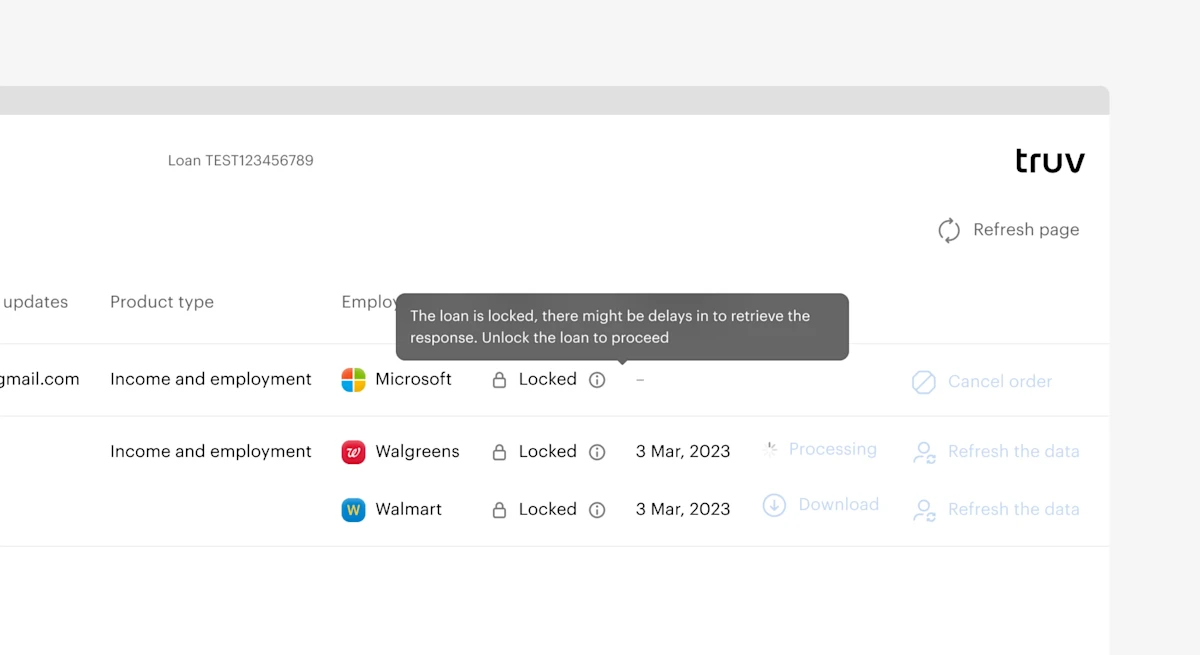
Encompass is where many of you choose to operationalize your lending business, which is why Truv is committed to providing you with the best user experience possible. This past sprint we’ve added visibility into the order status of an existing order.
- This gives someone working on the loan the ability to see if the order is locked before trying to take new actions.
- This feature will help reduce redundant work and keep Encompass orders in check.
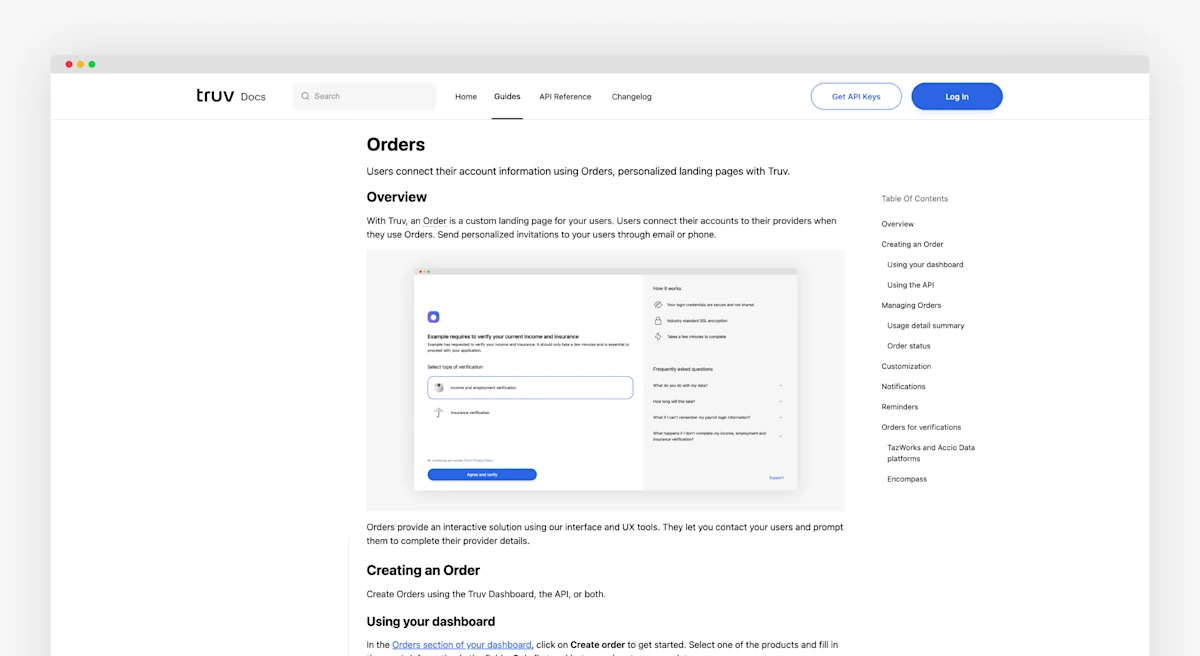
We’ve created a custom documentation link for Order Managers. When an assigned Order Manager clicks the docs button of the Truv Dashboard, they proceed to a dedicated docs page for Order management. This helps Order Managers find the right content more easily.
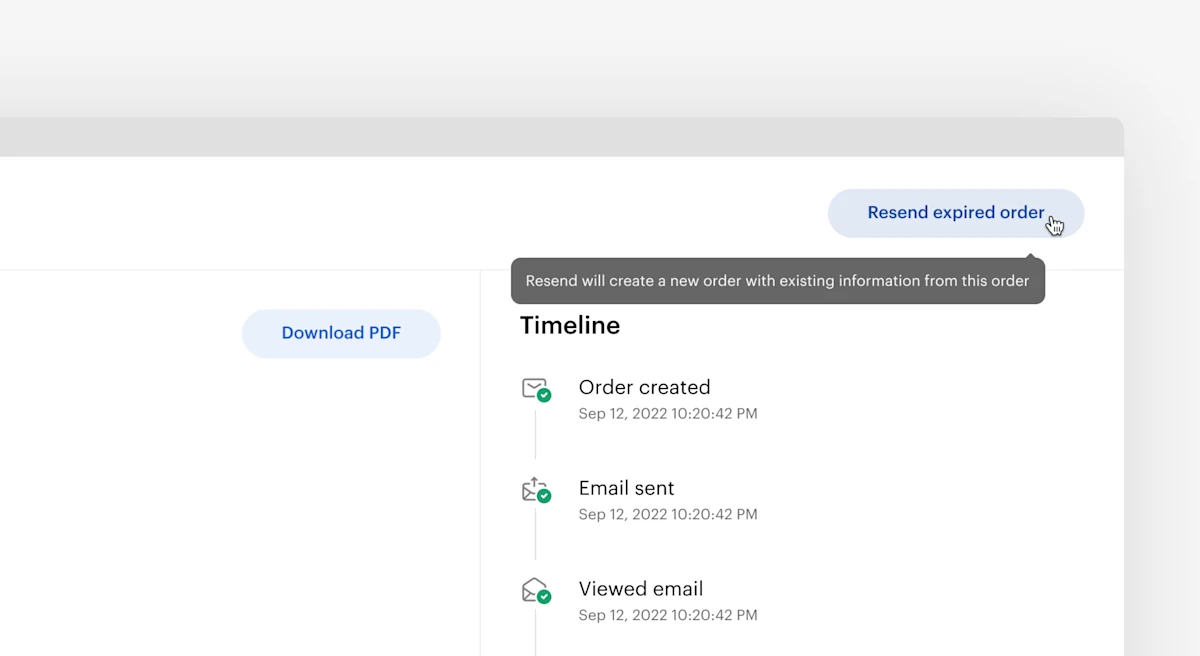
Truv has created a seamless way to resend previously expired Orders without having to start the order creation process from scratch. In the Truv Dashboard, users can click the envelope icon next to an expired Order. They can also click the Resend Order button after clicking into the Order details. When using the resend functionality, data from the previous Order including First Name, Last Name, Phone Number, and Email are automatically ported in. This helps create a more efficient workflow.
Our UI update for the Encompass Orders page adds a new field called Status Update. This field allows users to enter additional email contacts. This can be different managers needing notifications about updates to a specific Order status. This process now allows all relevant parties to stay informed on an Order status.
Encompass previously only displayed an overview of new Orders for Truv. We have now added tabs and let users to switch views between new Orders and Order status. We’ve also added new functionality to the Order status tab.
Encompass users can now cancel an order, download an Order report, or refresh Order data directly in the table. These buttons on the right of the table reduce the workload for Encompass users and allow them to create a more efficient workflow.
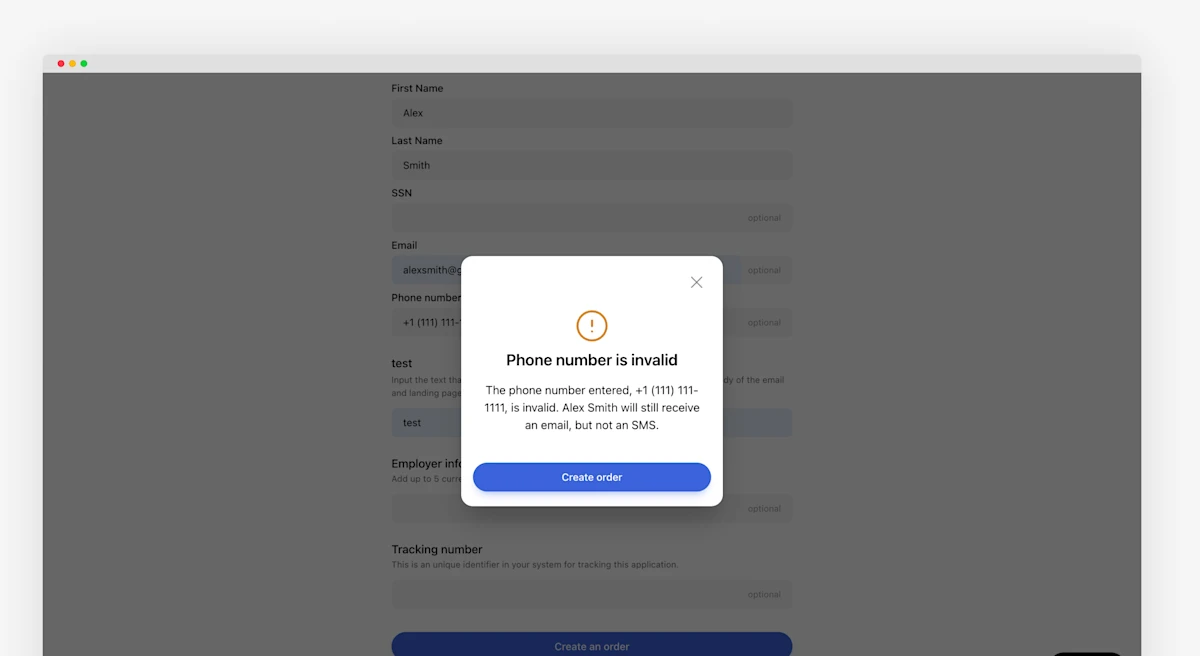
As part of your waterfall when an Order is created, we’ve had an issue where the Order creation screen is blocked if the applicant has a valid email and invalid SMS number. We’ve removed the validation to have both an email and phone number for an applicant. This simplifies creating Orders when a single valid channel can notify the applicants or borrowers.
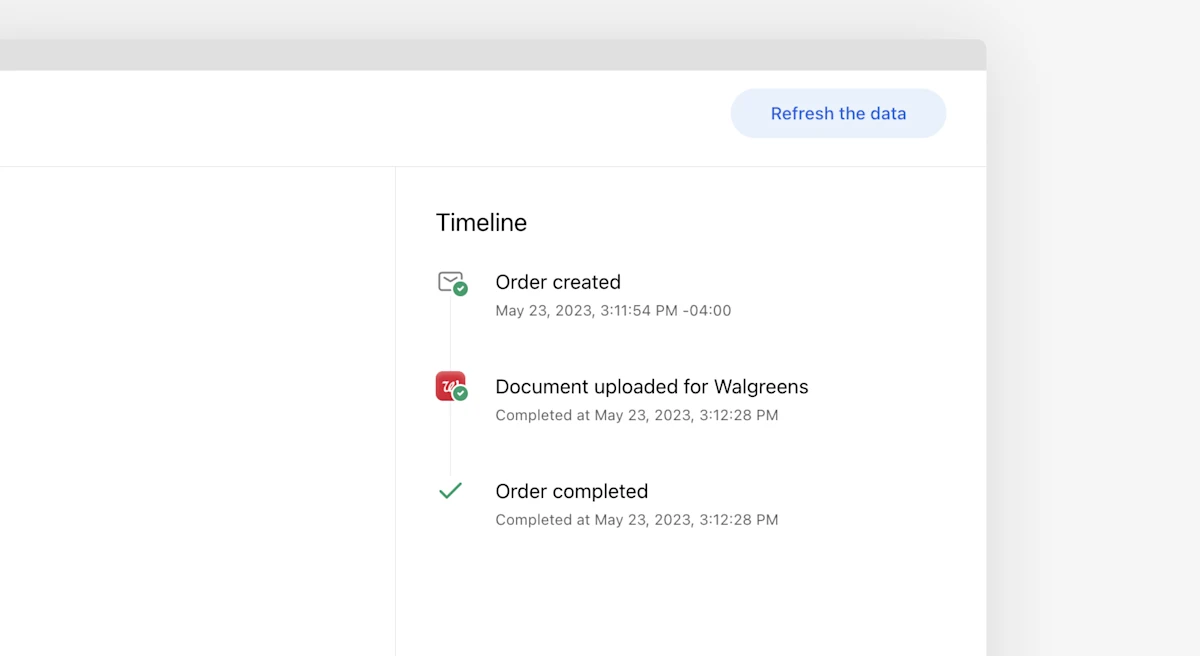
Truv has multiple data sources for receiving information and now we’ve added data source and data providers across Truv’s products. As part of this effort, we’ve added the same to the Order timeline. This provides a more granular view of completed verifications for Order managers. For example, notifications are available when a payroll provider was connected or a document was uploaded.
We’ve made enhancements in Encompass LO Connect and SmartClient based on feedback.
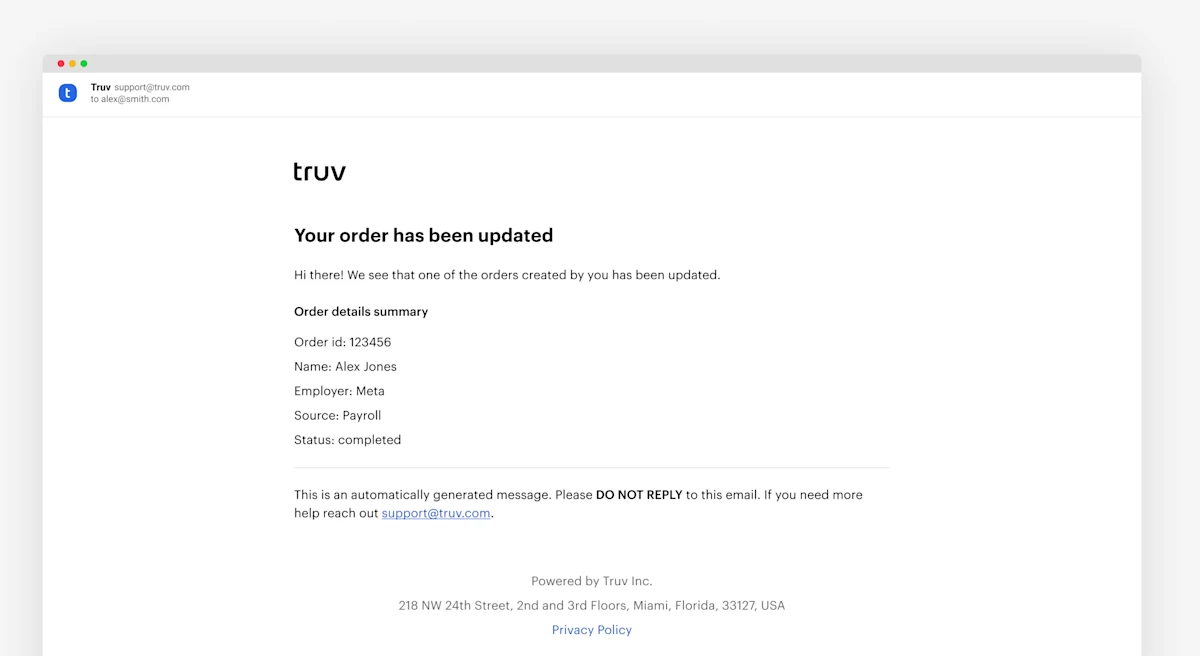
For Encompass clients, we have removed the Check order status button in Order notifications. These no longer redirect Loan Officers and Processors to the Truv dashboard. This update provides a more cohesive experience for all LOs.
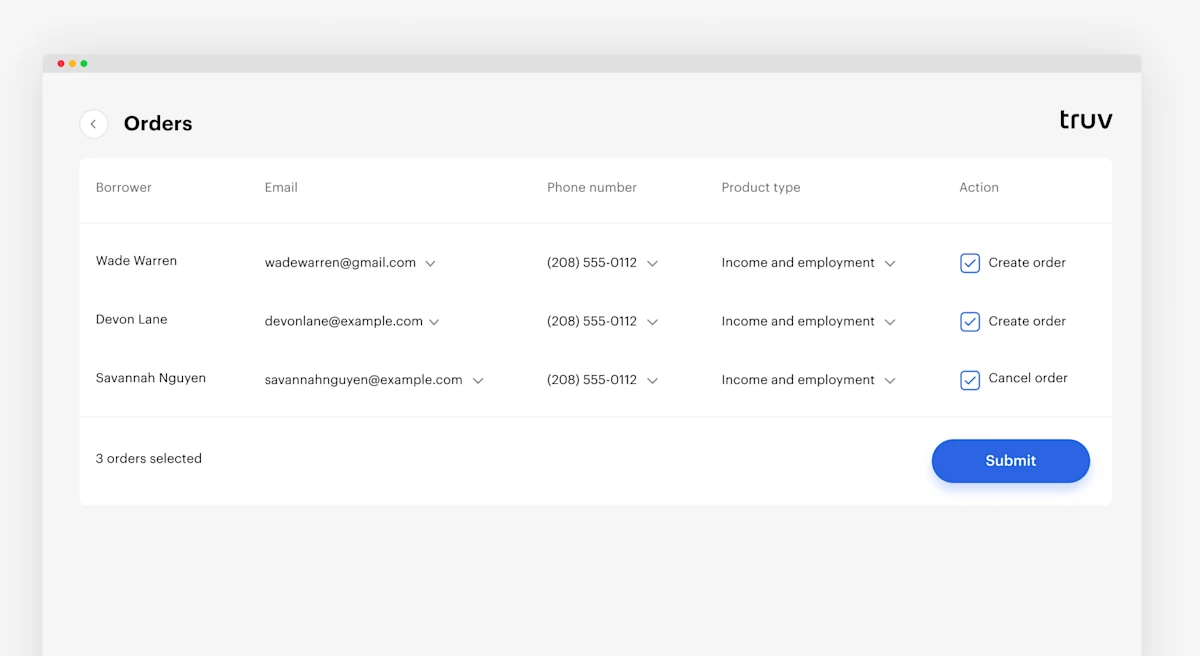
We have updated Truv flows to allow for the following enhancements.
- Default product type has been set to Income and Employment for creating Orders
- Loan Officers now can see applicant email and phone number when borrowers opt in to receive SMS updates
- On Order creation, the columns
StatusandOrdered dateare hidden to help streamline workflows
Order Expiration Date Customization: We’ve added two new options when selecting the expiration date for orders. We’ve added a 3 week and a 4 week timeline to the existing options.
PDF Report New Field: We’ve added the Time Employed in Current Role field to our PDF reports. This requested field helps underwriters make informed loan decisions.
Order Notifications: We’ve added Encompass notifications of order statuses for order creators. These notifications include User Name, Employer Name, Order ID, Source, and Status. This allows an organization to keep creators informed and work more efficiently.
Order Notifications: We’ve added notifications for created order statuses. These notifications include User Name, Employer Name, Order ID, Source, and Status. Organizations can now update creators more efficiently.
Mobile Landing Page Redesign: We’ve redesigned the mobile landing page in Orders. We’ve streamlined the applicant experience with a more concise workflow for improved success rates
We’ve updated the Create an order endpoint. The returned Order object now includes user_id.
We have made small changes to field names in layout in both Order details and the PDF report for data pulls for both Employment history verifications and Income & Employment verifications. In accordance with industry norms, we now show current as of date, which references the most recent paycheck date in the report. Also, we have updated the layout order of the Annual income summary.
There was a minor bug that caused some dates in Insurance reports on the screen to mismatch with the dates reported in the PDF report. This has been fixed.
Upon request, we can now offer custom logos to appear in the PDF report for verifications. We can enable this feature ad hoc upon request, and when enabled, it will use the logo that has been uploaded to the Branding configurations within your Dashboard.
We have added a new column for Created by in the Orders list, which allows users to search and filter by specific order creators.
- New products are now available:
DDS,PLL, andAdmin - Landing page has been redesigned
Truv Orders update: Option to skip the verification
We introduced an option to skip verification flow by the end-user when their login attempt is failed. It allows our order clients to get an update and move forward with fallback options.
Truv Bridge update: Paycom and Paychex reset flow
We introduced additional native reset flows for Paycom and Paychex when username or password are not available.
- Added new
order-status-updatedevent toWebhooks, related toOrders. - Added new
POST /orders/{id}/cancel/Cancel order. - Updated
Paycheck Linked Loansreport. Added new product type. - Added information about
Webhookstimeouts.
- Added
Paycheck linked loans. - Added new
PATCH /bridge-tokens/{bridge_token}/Bridge. - Field
dates_from_statementshas been deprecated, please use arrayderived_fieldsto find which fields were derived.
Order Endpoints – Added the /orders and /orders/{id} endpoints.