
Changelog
Get the latest feature updates in Truv
- Template configuration options and text clarification:
- Within Truv Dashboard → Customization → Templates, we corrected misleading text, aligned submenu verbiage, and provided links to documentation to make setup easier. The following changes were made:
- Moved expiry dropdown options (
1 day,2 days,3 days,1 week,2 weeks,3 weeks,4 weeks) to the template page, along with the support email address. Users can select one of these options, with3 daysset as the default. - Added Learn more about expiration link under ‘Link expiration’ on the first page to clarify how link and order expiration works exactly.
- Moved expiry dropdown options (
- Within Truv Dashboard → Customization → Templates, we corrected misleading text, aligned submenu verbiage, and provided links to documentation to make setup easier. The following changes were made:
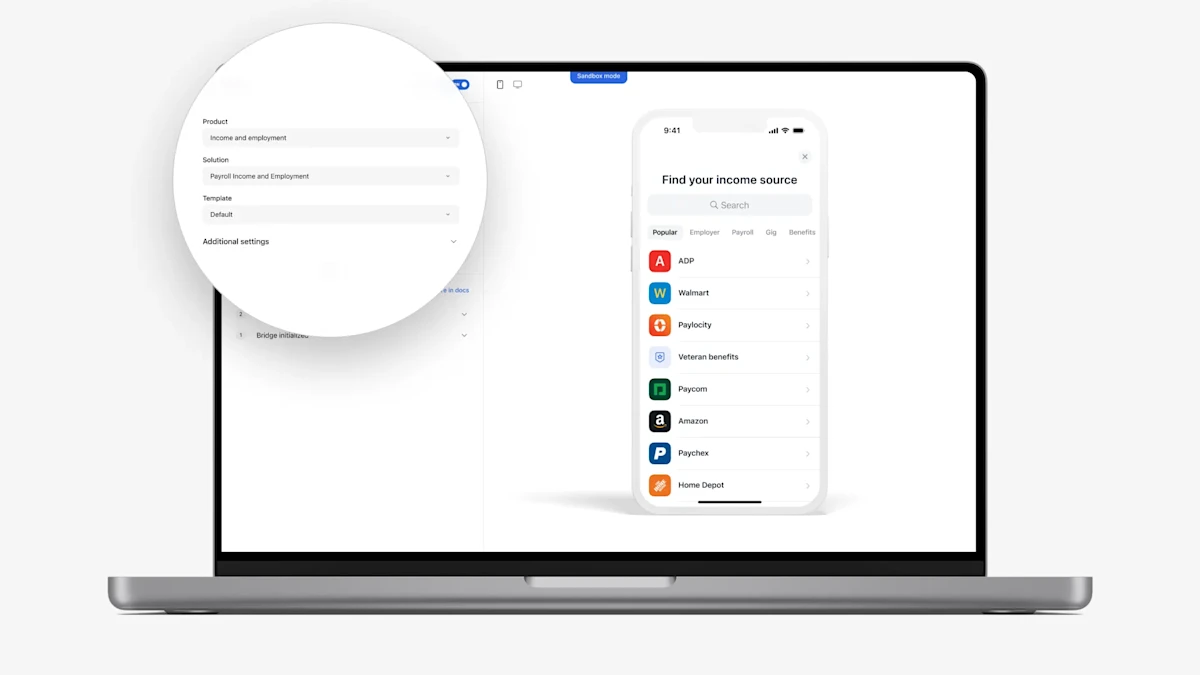
- Emulator settings:
- We have updated the Emulator in Truv Dashboard to align available products to the selected use-case and show additional solutions that can be used. See below for a full summary of changes:
- Removed Bridge and Orders
- Switched the name of ‘Solution’ and ‘Product’ fields to correctly align these
- In Sandbox mode, under ‘Additional settings’ we added a dropdown to select a use case. We will filter the list of available products based on the selected use-case. In Production mode, the account’s use-case is automatically applied.
- Clarified how the ‘Payroll Income and Employment’ and ‘Payroll Employment History’ options work. Now when these ‘Solutions’ are selected we open a payroll only solution in the Truv Bridge, with no fallback if the user is unable to login or exits.
- Added two additional Solutions: “Smart Routing” and “Fallback”, which are designated with a ‘Workflow’ tag. In Sandbox mode, Smart Routing will open financial accounts connection to complete the verification if the selected employer has a low success rate. In Sandbox mode, Fallback will offer Truv’s Document Upload solution if the user is unable to login or tries to exit. In Production mode, these solutions only appear and work as configured at the account-level.
- We have updated the Emulator in Truv Dashboard to align available products to the selected use-case and show additional solutions that can be used. See below for a full summary of changes:
- Dashboard bug fixes
- Assets report UI improvements for Users (beta) tab: In the Truv Dashboard for Assets reports, we have resolved an issue where users who completed Assets verification encountered an error when switching to the Assets tab. Notably, the Assets report PDF remained downloadable before switching tabs. Additionally, we have fixed the behavior of the Report submenu to ensure it no longer collapses when a report is available.
- Introduced Jan 31, 2025 → Fixed Feb 05, 2025
- Impacted clients: Clients with Assets product
- Usage reports count fix: We identified and resolved an issue where only 10 reports were displayed on the page by default, which cut off the months of January and February. Now, all available reports are properly displayed, ensuring full visibility and access.
- Assets report UI improvements for Users (beta) tab: In the Truv Dashboard for Assets reports, we have resolved an issue where users who completed Assets verification encountered an error when switching to the Assets tab. Notably, the Assets report PDF remained downloadable before switching tabs. Additionally, we have fixed the behavior of the Report submenu to ensure it no longer collapses when a report is available.