
Changelog
Get the latest feature updates in Truv
- Emulator Updates in Sandbox Mode:
Planned to go-live Feb 14- Since Truv supports multiple use cases, we plan to update our emulator to better align our products with specific use-case requirements.
- Show applicable products per each use-case. For instance, a mortgage client would not see a cashflow underwriting product.
- Remove
BridgeandOrderstab as you have the ability create Orders in Truv Dashboard → Orders in Sandbox mode and replicate the order workflow as in production. - Add
Income and Employment Fallback&Employment Fallbackas fallback options in Emulator so you can see the experience of Truv Bridge with and without Fallback. - NOTE: This release will not change any product behavior or response data. It is solely a realignment of Truv’s use cases and products to enhance clarity and reduce confusion.
- Since Truv supports multiple use cases, we plan to update our emulator to better align our products with specific use-case requirements.
- Empower: In Truv Dashboard → Platform Keys, we have added a page for the configuration of Empower Party IDs. Previously clients planning to go-live on Empower needed to request Truv to manually configure their Empower Party IDs to unblock testing. Now, once clients have received their Client Implementation Guide (CIG) from the Empower implementation team, they can add Sandbox and Production Party IDs directly in Truv Dashboard and begin the testing process required for approval. Check our docs for more information (link)
- Templates: In Truv Dashboard → Templates, we have moved some key settings to the first page to make them easier to find and configurations more intuitive. This includes the following: Add your end-user agreement or privacy policy, Link expiration, Notify order creator, Customer support email address, and Custom field.
- Usage: To add transparency to billing and invoicing, we have added a “Price” column to the Usage report .csv files that are downloadable by Owners and Admins in the Truv Dashboard → Usage tab. Additionally, we have backfilled this price data in Usage reports back to October 2024, the oldest period we can extract this data from our 3rd partner billing platform.
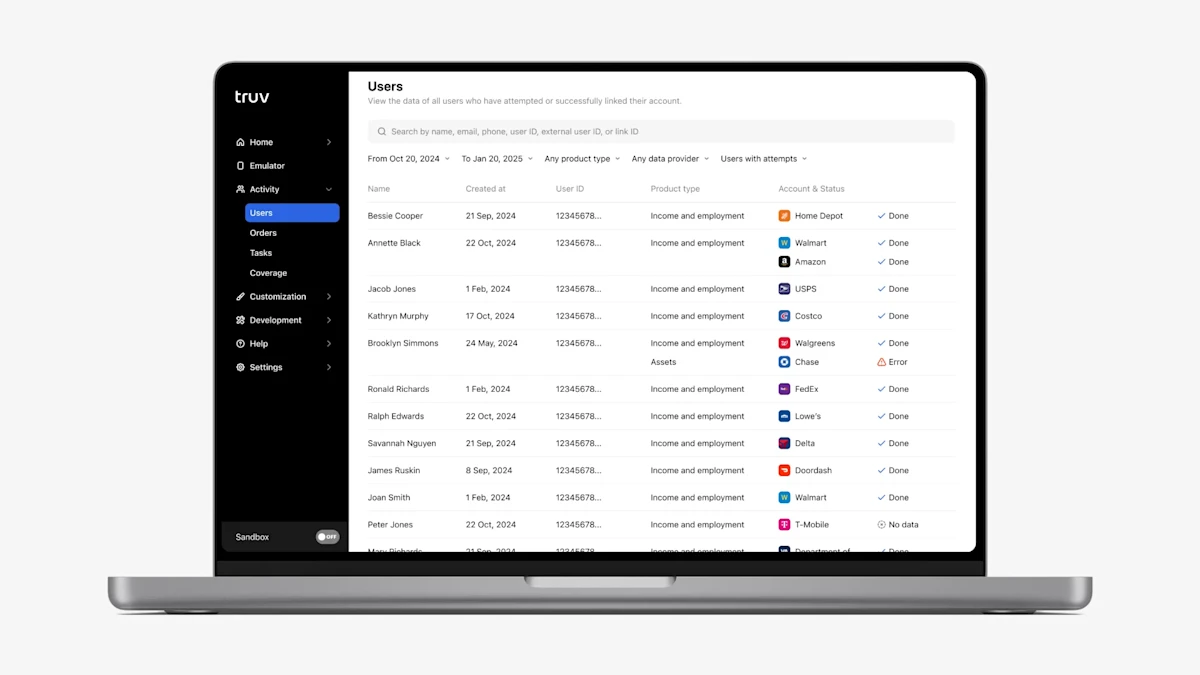
- User Tab (Beta Tab): We have introduced two additional enhancements to the new Users Tab to give clients more visibility into progress and make it easier to use.
- On the User Information page, once you click on a user row. There is now a timeline sidebar on the right side of the page. This timeline shows login attempts with provider, timestamp, and attempt outcome information, giving clients a full view into user progress that can help to determine the next best action for users who were unable to login successfully.
- On the Users table, we added a filter with the following values: Any user, Users with attempts, Users without attempts. By default, the filter is set to “Users with attempts”, showing only users who at least attempted to complete the Truv verification.
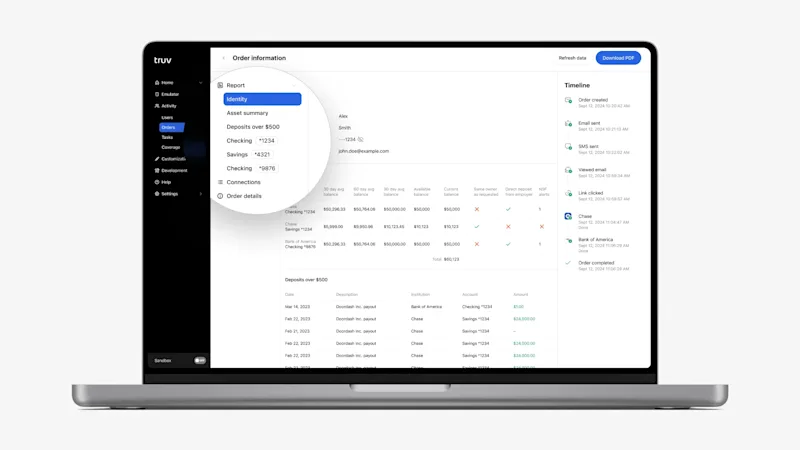
- Assets product in Truv Dashboard → Users, Orders: In the Truv Dashboard for Assets reports, we previously showed “Bank accounts” in the submenu and connected financial institutions as tabs, which was easy for users to overlook in cases multiple institutions were connected. To make the connected accounts more obvious and easier to navigate, we replaced the “Bank accounts” submenu item with placeholders for each connected account. Also, we now list all connected financial institutions, so there is no need to switch tabs in the report to see all the data.
- Reporting filters improvement: In the Dashboard → Reporting & Team Performance tabs, the predefined date filter options (Last 7 days, This week, Last 30 days, Last 90 days) excluded Today, which is unintuitive and confused some users. The filtering logic has now been updated to include Today for these predefined periods, ensuring a more accurate and user-friendly reporting experience. Available by Feb 3rd.
Dashboard bug fixes
- Status update notifications: There was a change rolled out that caused us to accidentally attach the report PDF to the order status update email for completed orders.
- Introduced Jan 22, 2025 → Fixed Jan 29, 2025
- Impacted clients: Clients using Truv orders (Dashboard, Orders API or custom LOS, Encompass, Byte, Empower)
- Truv Dashboard → Coverage: We identified and fixed an issue in the Truv Dashboard → Coverage → Financial accounts tab where we were showing a list of supported payroll providers instead of supported financial institutions.
- Truv Dashboard → Missing Orders due to Timezone issue: Due to an issue with timezone conversion, newly created orders would not appear in the Truv Dashboard during some parts of the day because their converted created date was in the future.
- Impacted clients: Clients creating order from Truv Dashboard late in the day
- Users Beta: In Truv Dashboard → Users Beta tab, there were some cases where Assets reports wouldn’t be available in the Dashboard for users who successfully connected a financial institution. Additionally, for clients using the Transactions product, in some cases loading the report took longer than usual. This has been resolved and reports are available and loading normally for both cases.
- Impacted clients: Embedded Clients with Assets or Transactions product and using Truv Dashboard Users Beta tab