
Changelog
Get the latest feature updates in Truv
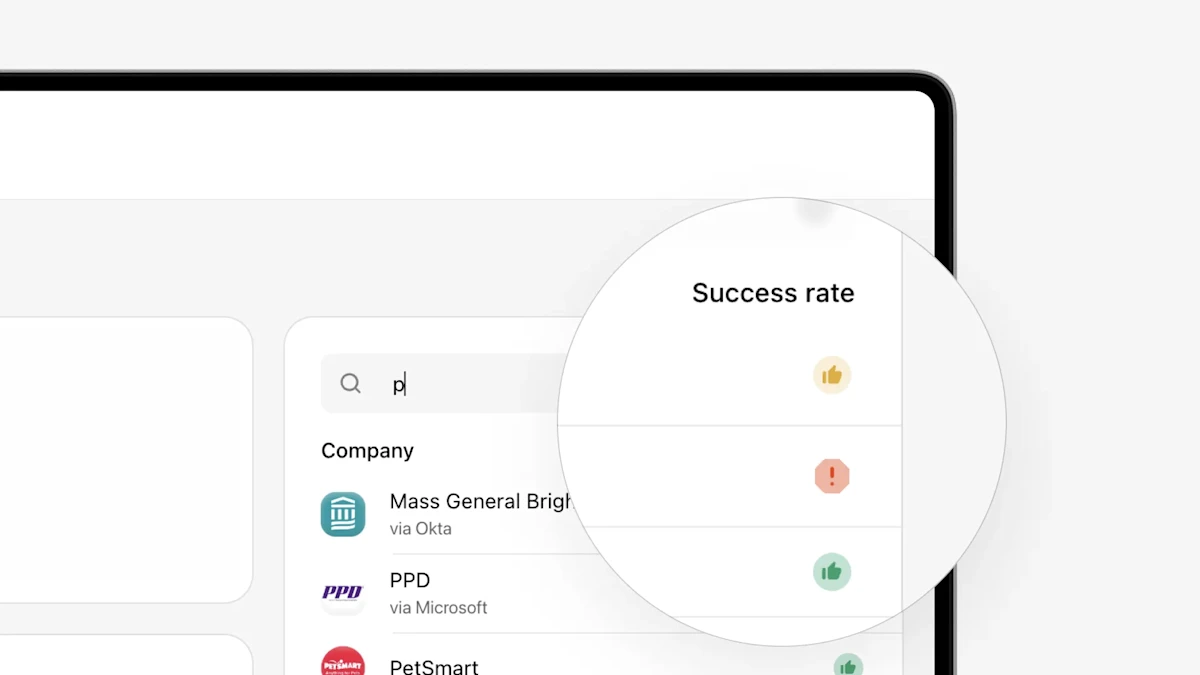
- Coverage updates in Truv Dashboard: In the Truv Dashboard, in the Company search feature on the right of the ‘Coverage’ tab and Employer search feature on the ‘Order Creation’ form, we showed coverage indicators that were small colored dots (green/yellow/gray) with explanation tooltips. These weren’t very visible and there was no context to explain what they meant unless users hovered over them. We have now updated these from green/yellow/gray dots to a green “thumbs up”, yellow “thumbs up” and red “warning sign” to make them more visible and better convey the meaning. When searching, we also added a Company and Success rate header over each column in the results to explain what is being shown if the user doesn’t hover over the tooltip. Lastly, we updated the tooltip descriptions to more clearly explain the success rate and provide a suggested action. These clearer indicators and suggested actions can help order managers improve their conversion with Truv by focusing on high success transactions and using alternatives where success isn’t likely. This is also accessible via Search compaines API.
- UI Design system change in Truv Dashboard: To create a standardized experience across the Truv Dashboard, we have rolled out the first part of a new standardized UI. Previously, there was a lot of variety in the placement of buttons, available actions, usage of fonts, size of pop-ups, etc, which could be confusing to users. In this release, there has been standardization in the usage of the following components across the Dashboard: checkboxes, buttons, dashboard cards, links, loading screens, text headers, pop-ups, switch buttons, tabs, tooltips and search fields.